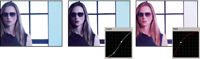
Adjust color and luminance using curves
The curves adjustment of the Luma Curve and the RGB Curves effects, like the Levels sliders in the Fast Color Corrector and the Three‑Way Color Corrector effects, let you adjust the entire tonal range or just a selected range of colors in a video clip. But unlike Levels, which has only three adjustments (black level, gray level, and white level), the Luma Curve and RGB Curves let you adjust up to 16 different points throughout an image’s tonal range (from shadows to highlights).
 Opening a scope in a Reference Monitor that’s ganged
to the Program Monitor lets you view the luminance, chrominance,
or both values as you make the curves adjustments. If you’re using
the Vectorscope, there should be minimal green shading in the areas
outside of the center of the scope. Areas outside the center define
the level of color saturation.
Opening a scope in a Reference Monitor that’s ganged
to the Program Monitor lets you view the luminance, chrominance,
or both values as you make the curves adjustments. If you’re using
the Vectorscope, there should be minimal green shading in the areas
outside of the center of the scope. Areas outside the center define
the level of color saturation.- Do one of the following to make curve adjustments:
-
To adjust the luminance, click to add a point on the Luma or Master graph and drag to change the shape of the curve. Bowing the curve upward lightens the clip and bowing the curve downward darkens the clip. The steeper sections of the curve represent portions of the image with greater contrast.
-
To adjust both the color and luminance using the RGB Curves effect, click to add a point on the appropriate graph to adjust all color channels (Master), the red channel, the green channel, or the blue channel. Drag to change the shape of the curve. Bowing the curve upward lightens the pixel values and bowing the curve downward darkens the pixel values. The steeper sections of the curve represent portions of the image with greater contrast.
You can add a maximum of 16 points to the curve. To delete a point, drag it off the graph.
As you make
adjustments, watch carefully for banding, noise, or polarization
in the image. If you notice any of these, reduce the value you are
adjusting. -