

Specify a color or range of colors to adjust
The Secondary Color Correction property specifies the color range to be corrected by an effect. You can define the color by hue, saturation, and luminance. The Secondary Color Correction property is available for the following effects: Luma Corrector, Luma Curve, RGB Color Corrector, RGB Curves, and Three‑Way Color Corrector.
By specifying a color or range of colors using the Secondary Color Correction, you are isolating a color correction effect to specific areas of an image. This is similar to making a selection or masking an image in Photoshop. For example, you define a range of colors that selects only a blue shirt in an image. You can then change the color of the shirt without affecting any other areas of the image.
- Do any of the following to increase or decrease the range
of colors you want to correct:
-
Use the + Eyedropper tool to extend the color range, and use the – Eyedropper tool to subtract from the color range.
-
Click the triangle to expand the Hue control, and then drag the Start Threshold and End Threshold sliders to define the color range where the correction is applied at 100%. Drag the Start Softness and End Softness sliders to control feathering, which determines whether the boundaries of the color range are sharply defined or soft. You can also enter the Start and End parameters numerically using the controls below the Hue control.
Note: The hue defined by the sliders can also be changed by dragging the upper or lower hue bands.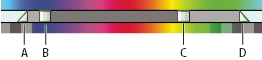 Hue control
- A.
- Start softness
- B.
- Start threshold
- C.
- End threshold
- D.
- End softness
-
Use the Saturation and Luma controls to specify saturation and luminance parameters for the color range to be color corrected. These controls fine‑tune the range of color specification.
-
- (Optional) Choose Mask from the Output menu to view the
areas selected for adjustment. White represents areas that allow
100% color correction, and black represents areas protected (masked)
from color correction. The gray areas allow partial application
of the color correction. This Mask view updates as you make further
adjustments to the Secondary Color Correction controls.
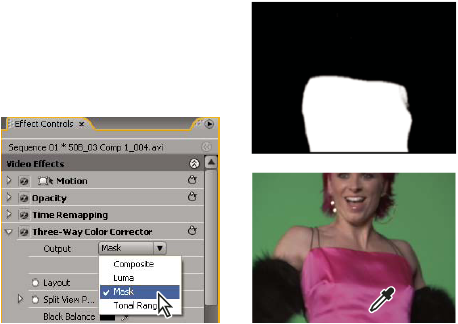 Choosing Mask from Output menu to display selected areas (white) and protected areas (black).