

About changes in speed
When you animate a property in the Graph Editor, you can view and adjust the rate of change of the property in the speed graph, or on the motion path in the Composition or Layer panel. As you adjust the rate in one panel, you can view the changes in the other. In the speed graph, changes in the graph height indicate changes in speed. Level values indicate constant speed; higher values indicate increased speed.
In the Composition or Layer panel, the spacing between dots in a motion path indicates speed. Each dot represents a frame, based on the frame rate of the composition. Even spacing indicates a constant speed, and wider spacing indicates a higher speed. Keyframes using Hold interpolation display no dots because there is no intermediate transition between keyframe values; the layer simply appears at the next keyframe’s position.
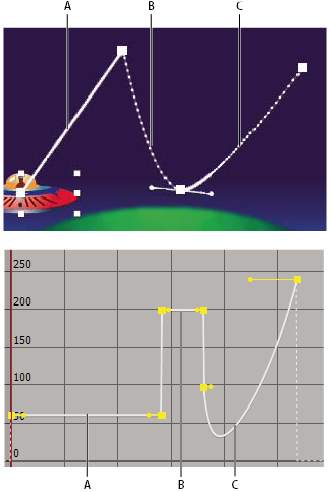
- A.
- Dots are close together, indicating lower speed (top); speed is constant (bottom).
- B.
- Dots are far apart, indicating greater speed (top); speed is constant (bottom).
- C.
- Inconsistent spacing of dots indicates changing speed (top); speed decreases and then increases (bottom).
The change of speed over time is affected by the following factors:
-
The time difference between keyframes in the Timeline panel. The shorter the time interval between keyframes, the more quickly the layer has to change to reach the next keyframe value. If the interval is longer, the layer changes more slowly, because it must make the change over a longer period of time. You can adjust the rate of change by moving keyframes forward or backward along the timeline.
-
The difference between the values of adjacent keyframes. A large difference between keyframe values, such as the difference between 75% and 20% opacity, creates a faster rate of change than a smaller difference, such as the difference between 30% and 20% opacity. You can adjust the rate of change by increasing or decreasing the value of a layer property at a keyframe.
-
The interpolation type applied for a keyframe. For example, it is difficult to make a value change smoothly through a keyframe when the keyframe is set to Linear interpolation, but you can switch to Bezier interpolation at any time, which provides a smooth change through a keyframe. If you use Bezier interpolation, you can adjust the rate of change even more precisely using direction handles.
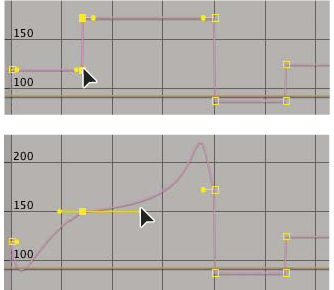 Linear interpolation (top) causes sharp changes; Bezier interpolation (bottom) creates smoother changes.