

Work with the Graph Editor
The Graph Editor represents property values using a two-dimensional graph, with composition time represented horizontally (from left to right). In layer bar mode, on the other hand, the time graph represents only the horizontal time element, without showing a graphical, vertical representation of changing values.
 To toggle between layer
bar mode and Graph Editor mode, click the Graph Editor button
To toggle between layer
bar mode and Graph Editor mode, click the Graph Editor button  in
the Timeline panel or press Shift+F3.
in
the Timeline panel or press Shift+F3.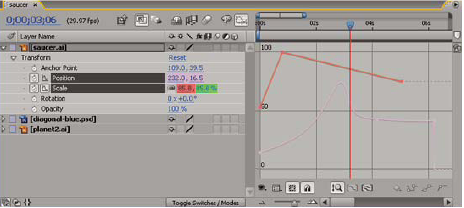
There are two types of graphs available in the Graph Editor: value graphs, which show property values; and speed graphs, which show rates of change of property values. For temporal properties, such as Opacity, the Graph Editor defaults to the value graph. For spatial properties, After Effects defaults to the speed graph.
In the Graph Editor, each property is represented by its own curve. You can view and work on one property at a time, or you can view multiple properties simultaneously. When more than one property is visible in the Graph Editor, each property’s curve has the same color as the property’s value in the layer outline.
When
you drag a keyframe in the Graph editor with the Snap button  selected, the
keyframe snaps to keyframe values, keyframe times, the current time,
In and Out points, markers, the beginning and end of the work area,
and the beginning and end of the composition. When the keyframe
snaps to one of these items, an orange line appears in the Graph
Editor to indicate the object you’re snapping to. Hold Ctrl (Windows)
or Command (Mac OS) after you’ve begun dragging to temporarily toggle
snapping behavior.
selected, the
keyframe snaps to keyframe values, keyframe times, the current time,
In and Out points, markers, the beginning and end of the work area,
and the beginning and end of the composition. When the keyframe
snaps to one of these items, an orange line appears in the Graph
Editor to indicate the object you’re snapping to. Hold Ctrl (Windows)
or Command (Mac OS) after you’ve begun dragging to temporarily toggle
snapping behavior.
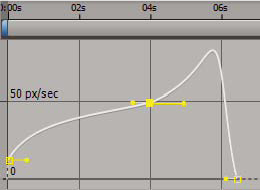
Keyframes in Graph Editor mode may have direction handles attached to one or both sides. Direction handles are used to control Bezier interpolation.
 Select which properties are shown in the Graph Editor
 Click the Show Properties button
  at
the bottom of the Graph Editor, and select from the following options:
at
the bottom of the Graph Editor, and select from the following options: - Show Selected Properties
- Displays selected properties in the Graph Editor.
- Show Animated Properties
- Displays animated properties of selected layers in the Graph Editor.
- Show Graph Editor Set
-
Displays properties that have the Graph Editor switch selected.
This switch is next to the stopwatch, to the left of the property name.
Graph Options in the Graph Editor
Click the Graph Options button  at
the bottom of the Graph Editor to select from the following options:
at
the bottom of the Graph Editor to select from the following options:
- Auto-Select Graph Type
- Automatically selects the appropriate graph type for a property: speed graphs for spatial properties (such as Position), and value graphs for other properties.
- Edit Value Graph
- Displays the value graph for all properties.
- Edit Speed Graph
- Displays the speed graph for all properties.
- Show Reference Graph
- Displays the unselected graph type in the background for viewing only. (The gray numbers to the right of the Graph Editor indicate the values for the reference graph.)
- Show Audio Waveforms
- Displays the audio waveform for any layer that has at least one property in the Graph Editor.
- Show Layer In/Out Points
- Displays In and Out points of all layers that have a property in the Graph Editor.
- Show Layer Markers
- Displays layer-time markers in the Graph Editor, if they exist.
- Show Graph Tool Tips
- Toggles the graph tool tips on and off.
- Show Expression Editor
- Shows or hides the expression editor field.
- Allow Keyframes Between Frames
- Allows placement of keyframes between frames for fine tuning animation.
Pan and zoom in the Graph Editor
- To pan vertically or
horizontally, drag with the Hand tool
 .
To activate the Hand tool momentarily
when using another tool, press and hold the spacebar.
.
To activate the Hand tool momentarily
when using another tool, press and hold the spacebar. - To zoom vertically, Alt-drag (Windows) or Option-drag
up with the Zoom tool to zoom in or down to zoom out.
Note: You cannot pan or zoom vertically when Auto Zoom Height
 is selected.
Auto Zoom Height and Fit
- Auto Zoom Height
- Toggles Auto Zoom Height mode, which automatically scales the height of the graph so that it fits the height of the Graph Editor. The horizontal zoom must still be adjusted manually.
- Fit Selection

- Adjusts the value (vertical) and time (horizontal) scale of the graph to fit the selected keyframes in the Graph Editor.
- Fit All

- Adjusts the value (vertical) and time (horizontal) scale of the graph to fit all of the graphs in the Graph Editor.