Move the playhead
The playhead moves through the timeline as a document plays to indicate the current frame displayed on the Stage. The Timeline header shows the frame numbers of the animation. To display a frame on the Stage, move the playhead to the frame in the Timeline.
To display a specific frame when you’re working
with a large number of frames that can’t all be displayed in the
Timeline at once, move the playhead along the Timeline.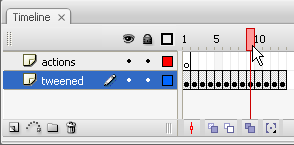
-
To go to a frame, click the frame’s location in the Timeline header, or drag the playhead to the desired position.
-
To center the Timeline on the current frame, click the Scroll To Playhead button at the bottom of the Timeline.
Moving the playhead
