Change the display of frames in the Timeline
-
To display
the Frame View pop‑up menu, click Frame View in the upper-right corner
of the Timeline.
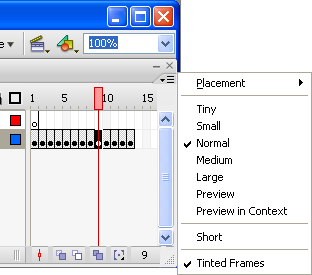 Frame View pop‑up menu
-
Select from the following options:
-
To change the width of frame cells, select Tiny, Small, Normal, Medium, or Large. (The Large frame-width setting is useful for viewing the details of sound waveforms.)
-
To decrease the height of frame cell rows, select Short.
 Short and Normal frame view options
-
To turn the tinting of frame sequences on or off, select Tinted Frames.
-
To display thumbnails of the content of each frame scaled to fit the Timeline frames, select Preview. This can cause the apparent content size to vary and requires extra screen space.
-
To display thumbnails of each full frame (including empty space), select Preview In Context. This is useful for viewing the way elements move in their frames over the course of the animation, but previews are generally smaller than with the Preview option.
-
