About the Flash drawing models
Flash provides two drawing models that give you a great deal of flexibility when drawing shapes:
- Merge Drawing model
-
The default drawing model automatically merges shapes that you draw when you overlap them. If you select a shape that is merged with another, and move it, the shape below it is permanently altered. For example, if you draw a circle and overlay a smaller circle on top of it, and then select the circle and move it, the portion of the second circle that overlaid the first circle is removed.
 Shapes created with the merge drawing mode merge together when they overlap. Selecting a shape and moving it results in the overlaid shape being altered.
- Object Drawing model
-
Draws shapes as separate objects that do not automatically merge together when overlaid. This overlaps shapes without altering their appearance if you move them apart, or rearrange their appearance. Flash creates each shape as a separate object that you can individually manipulate.
When you select a shape created using the Object Drawing model, Flash surrounds the shape with a rectangular bounding box. Use the Pointer tool to move the object by clicking the bounding box and dragging the shape to position it on the Stage.
Note: Set preferences for contact sensitivity when selecting shapes created using the Object Drawing model.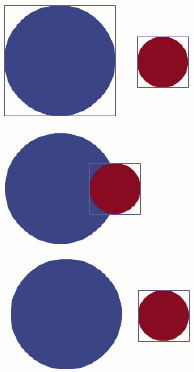 Shapes created with the Object Drawing model remain as separate objects the you can individually manipulate.
