About vector and bitmap graphics
Computers display graphics in either vector or bitmap format. Understanding the difference between the two formats helps you work more efficiently. Using Flash, you can create and animate compact vector graphics. Flash also imports and manipulates vector and bitmap graphics that were created in other applications.
Vector graphics
Vector graphics describe images by using lines and curves, called vectors, that also include color and position properties. For example, the image of a leaf is described by points through which lines pass, creating the leaf’s outline. The color of the leaf is determined by the color of the outline and the color of the area enclosed by the outline.

When you edit a vector graphic, you modify the properties of the lines and curves that describe its shape. Move, resize, reshape, and change the color of a vector graphic without changing the quality of its appearance. Vector graphics are resolution independent; that is, they can be displayed on output devices of varying resolutions without losing any quality.
Bitmap graphics
Bitmap graphics describe images using colored dots, called pixels, arranged in a grid. For example, the image of a leaf is described by the specific location and color value of each pixel in the grid, creating an image in much the same manner as a mosaic.
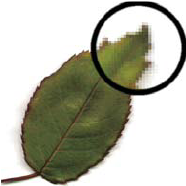
When you edit a bitmap graphic, you modify pixels rather than lines and curves. Bitmap graphics are resolution dependent, because the data describing the image is fixed to a grid of a particular size. Editing a bitmap graphic can change the quality of its appearance. In particular, resizing a bitmap graphic can make the edges of the image ragged as pixels are redistributed within the grid. Displaying a bitmap graphic on an output device that has a lower resolution than the image itself also degrades its quality.
