ActionScript 2.0 Language Reference 


ActionScript 2.0 Language Reference |
|
|
|
| ActionScript classes > MovieClip > lineStyle (MovieClip.lineStyle method) | |||
|
|||
|
|||
|
|||
public lineStyle(thickness:Number, rgb:Number, alpha:Number, pixelHinting:Boolean, noScale:String, capsStyle:String, jointStyle:String, miterLimit:Number) : Void
Specifies a line style that Flash uses for subsequent calls to the lineTo() and curveTo() methods until you call the lineStyle() method with different parameters. You can call lineStyle() in the middle of drawing a path to specify different styles for different line segments within a path.
Note: Calls to the clear() method set the value of line style back to undefined.
You can extend the methods and event handlers of the MovieClip class by creating a subclass.
Availability: ActionScript 1.0; Flash Player 6 - Additional parameters pixelHinting, noScale, capsStyle, jointStyle, and miterLimit are available in Flash Player 8.
thickness:Number - An integer that indicates the thickness of the line in points; valid values are 0 to 255. If a number is not specified, or if the parameter is undefined, a line is not drawn. If a value of less than 0 is passed, Flash Player uses 0. The value 0 indicates hairline thickness; the maximum thickness is 255. If a value greater than 255 is passed, the Flash interpreter uses 255.
rgb:Number - A hexadecimal color value of the line; for example, red is 0xFF0000, blue is 0x0000FF, and so on. If a value isn't indicated, Flash uses 0x000000 (black).
alpha:Number - An integer that indicates the alpha value of the line's color; valid values are 0 to 100. If a value isn't indicated, Flash uses 100 (solid). If the value is less than 0, Flash uses 0; if the value is greater than 100, Flash uses 100.
pixelHinting:Boolean - Added in Flash Player 8. A Boolean value that specifies whether to hint strokes to full pixels. This affects both the position of anchors of a curve and the line stroke size itself. With pixelHinting set to true, Flash Player hints line widths to full pixel widths. With pixelHinting set to false, disjoints can appear for curves and straight lines. For example, the following illustrations show how Flash Player renders two rounded rectangles that are identical, except that the pixelHinting parameter used in the lineStyle() method is set differently (the images are scaled by 200%, to emphasize the difference):
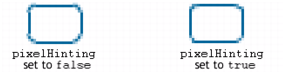
If a value is not supplied, the line does not use pixel hinting.
noScale:String - Added in Flash Player 8. A string that specifies how to scale a stroke. Valid values are as follows:
"normal"--Always scale the thickness (the default)."none"--Never scale the thickness."vertical"--Do not scale thickness if object is scaled vertically only."horizontal"--Do not scale thickness if object is scaled horizontally only.capsStyle:String - Added in Flash Player 8. A string that specifies the type of caps at the end of lines. Valid values are: "round", "square", and "none". If a value is not indicated, Flash uses round caps.
For example, the following illustrations show the different capsStyle settings. For each setting, the illustration shows a blue line with a thickness of 30 (for which the capsStyle applies), and a superimposed black line with a thickness of 1 (for which no capsStyle applies):

jointStyle:String - Added in Flash Player 8. A string that specifies the type of joint appearance used at angles. Valid values are: "round", "miter", and "bevel". If a value is not indicated, Flash uses round joints.
For example, the following illustrations show the different capsStyle settings. For each setting, the illustration shows an angled blue line with a thickness of 30 (for which the jointStyle applies), and a superimposed angled black line with a thickness of 1 (for which no jointStyle applies):
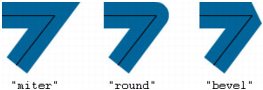
Notice that for jointStyle set to "miter", you can limit the length of the miter point by using the miterLimit parameter.
miterLimit:Number - Added in Flash Player 8. A number that indicates the limit at which a miter is cut off. Valid values range from 1 to 255 (and values outside of that range are rounded to 1 or 255). This value is only used if the jointStyle is set to "miter". If a value is not indicated, Flash uses 3. The miterLimit value represents the length that a miter can extend beyond the point at which the lines meet to form a joint. The value expresses a factor of the line thickness. For example, with a miterLimit factor of 2.5 and a thickness of 10 pixels, the miter is cut off at 25 pixels.
For example, consider the following angled lines, each drawn with a thickness of 20, but with miterLimit set to 1, 2, and 4. Superimposed are black reference lines showing the meeting points of the joints:
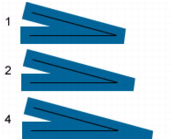
Notice that for a given miterLimit value, there is a specific maximum angle for which the miter is cut off. The following table lists some examples:
|
|
Angles smaller than this are cut off: |
|---|---|
|
1.414 |
90 degrees |
|
2 |
60 degrees |
|
4 |
30 degrees |
|
8 |
15 degrees |
The following code draws a triangle with a 5-pixel, solid magenta line with no fill, with pixel hinting, no stroke scaling, no caps, and miter joints with miterLimit set to 1:
this.createEmptyMovieClip("triangle_mc", this.getNextHighestDepth());
triangle_mc.lineStyle(5, 0xff00ff, 100, true, "none", "round", "miter", 1);
triangle_mc.moveTo(200, 200);
triangle_mc.lineTo(300, 300);
triangle_mc.lineTo(100, 300);
triangle_mc.lineTo(200, 200);
If your SWF file includes a version 2 component, use the version 2 components' DepthManager class instead of the MovieClip.getNextHighestDepth() method, which is used in this example.
beginFill (MovieClip.beginFill method), beginGradientFill (MovieClip.beginGradientFill method), clear (MovieClip.clear method), curveTo (MovieClip.curveTo method), lineTo (MovieClip.lineTo method), moveTo (MovieClip.moveTo method)
|
|||
|
|||
|
|||
|
|
|
|