ActionScript 2.0 Language Reference 


ActionScript 2.0 Language Reference |
|
|
|
| ActionScript classes > MovieClip > curveTo (MovieClip.curveTo method) | |||
|
|||
|
|||
|
|||
Draws a curve using the current line style from the current drawing position to (anchorX, anchorY) using the control point that ((controlX, controlY) specifies. The current drawing position is then set to (anchorX, anchorY). If the movie clip that you are drawing in contains content that was created with the Flash drawing tools, calls to the curveTo() method are drawn underneath this content. If you call the curveTo() method before any calls to the moveTo() method, the current drawing position is set to the default (0,0). If any of the parameters are missing, this method fails and the current drawing position is not changed.
You can extend the methods and event handlers of the MovieClip class by creating a subclass.
Availability: ActionScript 1.0; Flash Player 6
controlX:Number - An integer that specifies the horizontal position of the control point relative to the registration point of the parent movie clip.
controlY:Number - An integer that specifies the vertical position of the control point relative to the registration point of the parent movie clip.
anchorX:Number - An integer that specifies the horizontal position of the next anchor point relative to the registration point of the parent movie clip.
anchorY:Number - An integer that specifies the vertical position of the next anchor point relative to the registration point of the parent movie clip.
The following example draws a nearly circular curve with a solid blue hairline stroke and a solid red fill:
this.createEmptyMovieClip("circle_mc", 1);
with (circle_mc) {
    lineStyle(0, 0x0000FF, 100);
    beginFill(0xFF0000);
    moveTo(0, 100);
    curveTo(0,200,100,200);
    curveTo(200,200,200,100);
    curveTo(200,0,100,0);
    curveTo(0,0,0,100);
    endFill();
}
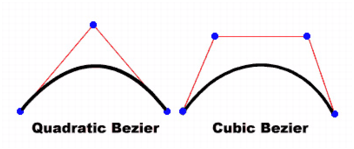
The curve drawn in this example is a quadratic Bezier curve. Quadratic Bezier curves consist of two anchor points and a control point. The curve interpolates the two anchor points, and curves toward the control point.
The following script uses the curveTo() method and the Math class to create a circle:
this.createEmptyMovieClip("circle2_mc", 2);
circle2_mc.lineStyle(0, 0x000000);
drawCircle(circle2_mc, 100, 100, 100);
function drawCircle(mc:MovieClip, x:Number, y:Number, r:Number):Void {
    mc.moveTo(x+r, y);
    mc.curveTo(r+x, Math.tan(Math.PI/8)*r+y, Math.sin(Math.PI/4)*r+x,
Math.sin(Math.PI/4)*r+y);
    mc.curveTo(Math.tan(Math.PI/8)*r+x, r+y, x, r+y);
    mc.curveTo(-Math.tan(Math.PI/8)*r+x, r+y, -Math.sin(Math.PI/4)*r+x,
Math.sin(Math.PI/4)*r+y);
    mc.curveTo(-r+x, Math.tan(Math.PI/8)*r+y, -r+x, y);
    mc.curveTo(-r+x, -Math.tan(Math.PI/8)*r+y, -Math.sin(Math.PI/4)*r+x,
-Math.sin(Math.PI/4)*r+y);
    mc.curveTo(-Math.tan(Math.PI/8)*r+x, -r+y, x, -r+y);
    mc.curveTo(Math.tan(Math.PI/8)*r+x, -r+y, Math.sin(Math.PI/4)*r+x,
-Math.sin(Math.PI/4)*r+y);
    mc.curveTo(r+x, -Math.tan(Math.PI/8)*r+y, r+x, y);
}
For another example, see the Flash Samples page at www.adobe.com/go/learn_fl_samples. Download and decompress the Samples zip file and go to the ActionScript2.0\DrawingAPI folder to access the drawingapi.fla file.
beginFill (MovieClip.beginFill method), createEmptyMovieClip (MovieClip.createEmptyMovieClip method), endFill (MovieClip.endFill method), lineStyle (MovieClip.lineStyle method), lineTo (MovieClip.lineTo method), moveTo (MovieClip.moveTo method), Math
|
|||
|
|||
|
|||
|
|
|
|