ActionScript 2.0 Language Reference 


ActionScript 2.0 Language Reference |
|
|
|
| ActionScript classes > MovieClip > lineGradientStyle (MovieClip.lineGradientStyle method) | |||
|
|||
|
|||
|
|||
public lineGradientStyle(fillType:String, colors:Array, alphas:Array, ratios:Array, matrix:Object, [spreadMethod:String], [interpolationMethod:String], [focalPointRatio:Number]) : Void
Specifies a line style that Flash uses for subsequent calls to the lineTo() and curveTo() methods until you call the lineStyle() method or the lineGradientStyle() method with different parameters. You can call the lineGradientStyle() method in the middle of drawing a path to specify different styles for different line segments within a path.
Note: Call lineStyle() before you call lineGradientStyle() to enable a stroke, otherwise the value of line style remains undefined.
Note: Calls to clear() set the line style back to undefined.
You can extend the methods and event handlers of the MovieClip class by creating a subclass.
Availability: ActionScript 1.0; Flash Player 8
fillType:String - Valid values are "linear" or "radial".
colors:Array - An array of RGB hexadecimal color values that you use in the gradient (for example, red is 0xFF0000, blue is 0x0000FF, and so on). You can specify up to 15 colors. For each color, ensure that you specify a corresponding value in the alphas and ratios parameters.
alphas:Array - An array of alpha values for the corresponding colors in the colors array; valid values are 0 to 100. If the value is less than 0, Flash uses 0. If the value is greater than 100, Flash uses 100.
ratios:Array - An array of color distribution ratios; valid values are from 0 to 255. This value defines the percentage of the width where the color is sampled at 100%. Specify a value for each value in the colors parameter.
For example, for a linear gradient that includes two colors, blue and green, the following figure illustrates the placement of the colors in the gradient based on different values in the ratios array:
|
|
Gradient |
|---|---|
|
|
|
|
|
|
|
|
|
The values in the array must increase, sequentially; for example, [0, 63, 127, 190, 255].
matrix:Object - A transformation matrix that is an object with one of the following sets of properties:
a, b, c, d, e, f, g, h, i to describe a 3 x 3 matrix of the following form:
 a b c
 d e f
 g h i
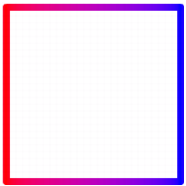
The following example uses the lineGradientFill() method with a matrix parameter that is an object with the following properties:
this.createEmptyMovieClip("gradient_mc", 1);
with (gradient_mc) {
    colors = [0xFF0000, 0x0000FF];
        alphas = [100, 100];
        ratios = [0, 0xFF];
        matrix = {a:200, b:0, c:0, d:0, e:200, f:0, g:200, h:200, i:1};
        spreadMethod = "reflect";
        interpolationMethod = "linearRGB";
        focalPointRatio = 0.9;
    lineStyle(8);
        lineGradientStyle("linear", colors, alphas, ratios, matrix,
        spreadMethod, interpolationMethod, focalPointRatio);
        moveTo(100, 100);
        lineTo(100, 300);
        lineTo(300, 300);
        lineTo(300, 100);
        lineTo(100, 100);
        endFill();
}
This code draws the following image onscreen:
matrixType, x, y, w, h, r.
The properties indicate the following: matrixType is the string "box", x is the horizontal position relative to the registration point of the parent clip for the upper-left corner of the gradient, y is the vertical position relative to the registration point of the parent clip for the upper-left corner of the gradient, w is the width of the gradient, h is the height of the gradient, and r is the rotation in radians of the gradient.
The following example uses the lineGradientFill() method with a matrix parameter that is an object with these properties:
this.createEmptyMovieClip("gradient_mc", 1);
with (gradient_mc) {
    colors = [0xFF0000, 0x0000FF];
    alphas = [100, 100];
    ratios = [0, 0xFF];
    matrix = {matrixType:"box", x:100, y:100, w:200, h:200, r:(45/180)*Math.PI};
    spreadMethod = "reflect";
    interpolationMethod = "linearRGB";
    lineStyle(8);
    lineGradientStyle("linear", colors, alphas, ratios, matrix,
        spreadMethod, interpolationMethod);
    moveTo(100, 100);
    lineTo(100, 300);
    lineTo(300, 300);
    lineTo(300, 100);
    lineTo(100, 100);
    endFill();
}
spreadMethod:String [optional] - Valid values are "pad", "reflect," or "repeat," which controls the mode of the gradient fill.
interpolationMethod:String [optional] - Valid values are "RGB" or "linearRGB".
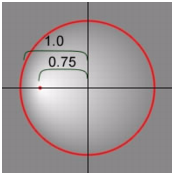
focalPointRatio:Number [optional] - A Number that controls the location of the focal point of the gradient. The value 0 means the focal point is in the center. The value 1 means the focal point is at one border of the gradient circle. The value -1 means that the focal point is at the other border of the gradient circle. Values less than -1 or greater than 1 are rounded to -1 or 1. The following image shows a gradient with a focalPointRatio of -0.75:
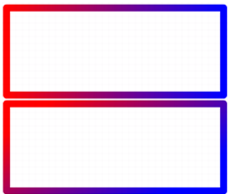
The following code uses both methods to draw two stacked rectangles with a red-blue line gradient fill:
this.createEmptyMovieClip("gradient_mc", 1);
with (gradient_mc) {
    colors = [0xFF0000, 0x0000FF];
    alphas = [100, 100];
    ratios = [0, 0xFF];
    matrix = {a:500, b:0, c:0, d:0, e:200, f:0, g:350, h:200, i:1};
    lineStyle(16);
    lineGradientStyle("linear", colors, alphas, ratios, matrix);
    moveTo(100, 100);
    lineTo(100, 300);
    lineTo(600, 300);
    lineTo(600, 100);
    lineTo(100, 100);
    endFill();
    matrix2 = {matrixType:"box", x:100, y:310, w:500, h:200, r:(30/180)*Math.PI};
    lineGradientStyle("linear", colors, alphas, ratios, matrix2);
    moveTo(100, 320);
    lineTo(100, 520);
    lineTo(600, 520);
    lineTo(600, 320);
    lineTo(100, 320);
    endFill();
}
This code draws the following image (the image is scaled by 50%):
beginGradientFill (MovieClip.beginGradientFill method), lineStyle (MovieClip.lineStyle method), lineTo (MovieClip.lineTo method), moveTo (MovieClip.moveTo method)
|
|||
|
|||
|
|||
|
|
|
|


