

Edit keyframe graphs
In the Effect Controls panel, you can make adjustments to keyframes for any effect property by editing their graphs. Alternately, you can make adjustments to effect keyframes in the Timeline panel while monitoring these changes in the Velocity and Value graphs in the Effect Controls panel.
 Edit keyframe graphs in the Effect Controls panel
Once you activate keyframing for an effect’s property, you can display the effect’s Value and Velocity graphs. Value graphs provide information about the value of nonspatial keyframes (such as the Scale parameter of the Motion effect) at any point in time. They also display and let you adjust the interpolation between keyframes. You can use the Velocity graph to fine‑tune the rate of change between keyframes.
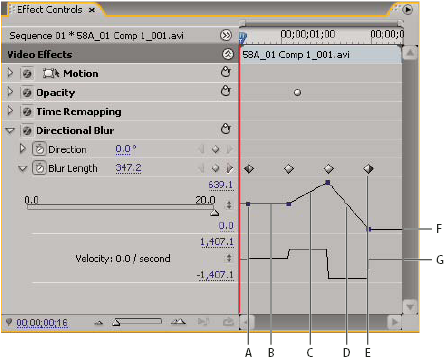
- A.
- Keyframe marker
- B.
- Level graph indicating unchanged value
- C.
- Rising graph indicating increasing value
- D.
- Falling graph indicating decreasing value
- E.
- Keyframe
- F.
- Value graph
- G.
- Velocity graph
- (Optional) To better view a graph, hover the Selection
or Pen tool over the boundary line below a graph until the pointer
turns into a segment pointer
 , and
then drag to increase the height of the graph area.
, and
then drag to increase the height of the graph area.
 or
keyframe segment pointer
or
keyframe segment pointer  .
.