

Timeline panel overview
You assemble and rearrange sequences in the Timeline panel, which represents a sequence graphically, showing clips, transitions, and effects. A sequence can consist of multiple video and audio tracks running parallel in the Timeline panel.
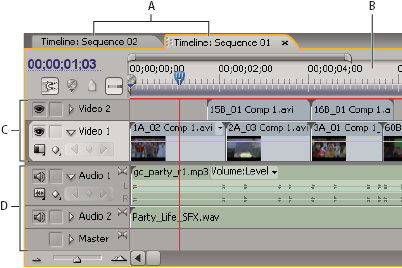
- A.
- Sequence tabs
- B.
- Time ruler
- C.
- Video tracks
- D.
- Audio tracks
Each sequence in a project can appear as a tab in a single Timeline panel, or in a separate Timeline panel. A sequence must contain at least one video track and one audio track. Multiple video tracks are used to superimpose clips.
Sequences with audio tracks must also contain a master audio track, where the output of regular audio tracks is directed for mixing. Multiple audio tracks are used to mix audio. You can specify the type of audio channels supported by each audio track and decide how they are sent to a Master audio track. To achieve even greater control over the mixing process, you can create submix tracks.