

Depth Matte effect
The Depth Matte effect reads the depth
information in a 3D image and slices the image anywhere along the
z axis. For example, you can remove a background in a 3D scene,
or you can insert objects into a 3D scene.
 To
insert a layer into a 3D scene, apply the Depth Matte effect to
the layer containing the 3D scene, set the Depth property to the
depth at which you want to insert the new layer, duplicate the 3D
scene layer, select Invert for the 3D scene layer on top, and place
the new layer between the two 3D scene layers in the layer stacking order
in the Timeline panel.
To
insert a layer into a 3D scene, apply the Depth Matte effect to
the layer containing the 3D scene, set the Depth property to the
depth at which you want to insert the new layer, duplicate the 3D
scene layer, select Invert for the 3D scene layer on top, and place
the new layer between the two 3D scene layers in the layer stacking order
in the Timeline panel.
To
insert a layer into a 3D scene, apply the Depth Matte effect to
the layer containing the 3D scene, set the Depth property to the
depth at which you want to insert the new layer, duplicate the 3D
scene layer, select Invert for the 3D scene layer on top, and place
the new layer between the two 3D scene layers in the layer stacking order
in the Timeline panel. This effect works with 8-bpc color.
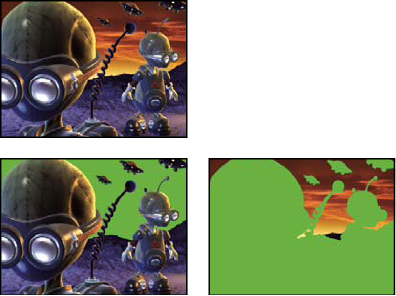
Original (top left), with effect applied (bottom left), and
with effect applied and Invert Alpha selected (bottom right)
- Depth
-
The z axis value at which to slice the image. Everything
with a depth value less than this Depth value is matted out.
To determine the depth of an object, click it in
the Composition panel or Layer panel using the Selection tool while
the effect is selected.
- Feather
- The amount of feather along the matte’s edges.
- Invert
- Select to matte out everything with a depth greater than the Depth value. Deselect to matte out everything with a depth less than the Depth value.