

3D Channel Extract effect
The 3D Channel Extract effect makes auxiliary channels visible as either grayscale or multichannel color images. You can then use the resulting layer as a control layer for other effects. For example, extract the depth information in a 3D channel image file and then use it as an influence map in the Particle Playground effect, or extract values from the unclamped RGB channel to produce a matte that generates glowing highlights.
 To display a pixel’s 3D channel values in
the Info panel, apply the 3D Channel Extract effect, select the
channel in the Effect Controls panel, and then click the pixel in
the Composition panel or Layer panel using the Selection tool.
To display a pixel’s 3D channel values in
the Info panel, apply the 3D Channel Extract effect, select the
channel in the Effect Controls panel, and then click the pixel in
the Composition panel or Layer panel using the Selection tool.This effect works with 8-bpc color.
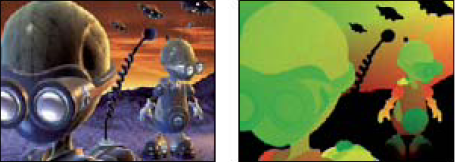
Original (left), with 3D Channel Extract applied using Texture
UV (right)
- 3D Channel
- The channel to extract from the 3D image.
- White Point, Black Point
- The value that is mapped to white or black.