

Caustics effect
This effect simulates caustics—reflections of light at the bottom of a body of water, created by light refracting through the water’s surface. The Caustics effect generates this reflection and creates realistic water surfaces when used with Wave World and Radio Waves.
This effect works with 8-bpc color.
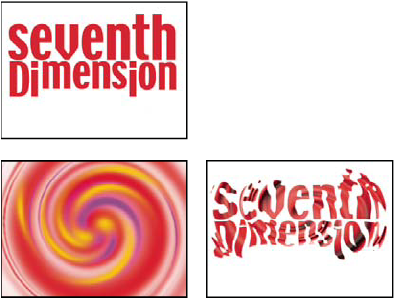
Original (top left), and with Bottom set to the text layer
(bottom left) and Water Surface set to the whirl layer with Surface
Opacity set to 0% (bottom right)
 To
get the most realistic results from Caustics, render the Bottom
layer separately, with Render Caustics enabled and Surface Opacity
at 0. Then precompose, and use the resulting layer as the Bottom
layer for another Caustics effect with Render Caustics off. With
this process you can offset, scale, or otherwise manipulate the
Bottom layer in the precomposed composition, and thus simulate lighting
that doesn’t come from straight overhead.
To
get the most realistic results from Caustics, render the Bottom
layer separately, with Render Caustics enabled and Surface Opacity
at 0. Then precompose, and use the resulting layer as the Bottom
layer for another Caustics effect with Render Caustics off. With
this process you can offset, scale, or otherwise manipulate the
Bottom layer in the precomposed composition, and thus simulate lighting
that doesn’t come from straight overhead. Bottom controls
The Bottom controls specify the appearance of the bottom of the body of water:
- Bottom
- Specifies the layer at the bottom of the body of water. This layer is the image that is distorted by the effect, unless Surface Opacity is 100%.
- Scaling
- Makes the bottom layer larger or smaller. If the edges of the bottom layer show, because of the refraction of the light through the waves, scale up the bottom layer. Scaling down is useful for tiling a layer to make a complex pattern.
- Repeat Mode
- Specifies how a scaled-down bottom layer is tiled. Once uses only one tile, basically turning tiling off. Tiles uses the traditional tiling method of abutting the right edge of one bottom layer tile to the left edge of another bottom layer tile. This option works well if the bottom layer contains a repeating pattern, like a logo, that needs to read a certain way. Reflected abuts each edge of a bottom layer tile to a mirrored copy of the tile. This option can eliminate a hard edge where the two tiles meet.
- If Layer Size Differs
- Specifies how to handle the bottom layer when it is smaller than the composition.
- Blur
- Specifies the amount of blur applied to the bottom layer. To make the bottom totally sharp, set this control to 0. Higher values make the bottom appear increasingly blurry, especially where the water is deeper.
Water controls
- Water Surface
- Specifies the layer to use as the water’s surface. Caustics uses the luminance of this layer as a height map for generating a 3D water surface. Light pixels are high, and dark pixels are low. You can use a layer created by using the Wave World or Radio Waves effect; precompose the layer before using it with Caustics.
- Wave Height
- Adjusts the relative height of the waves. Higher values make the waves steeper and the surface displacement more dramatic. Lower values smooth the Caustics surface.
- Smoothing
- Specifies the roundness of the waves by blurring the water surface layer. Very high values eliminate detail. Very low values show imperfections in the water surface layer.
- Water Depth
- Specifies depth. A small disturbance in shallow water moderately distorts the view of the bottom, but the same disturbance in deep water distorts the view significantly.
- Refractive Index
- Affects the way the light bends as it passes through the liquid. A value of 1 does not distort the bottom. The default value of 1.2 accurately simulates water. To add distortion, increase the value.
- Surface Color
- Specifies the color of the water.
- Surface Opacity
-
Controls how much of the bottom layer is visible through
the water. If you want a milky effect, increase the Surface Opacity
and Light Intensity values; a value of 0 results in a clear liquid.
Set Surface Opacity to 1.0 to perfectly reflect
a sky later. With a suitable texture map, you can use
this technique to create the effect of liquid mercury.
- Caustics Strength
- Displays the caustics, the concentrations of light on the bottom surface, caused by the lensing effect of the water waves. This control changes the way everything looks: The waves’ dark spots get much darker, and the light spots get much lighter. If you don’t set a value for this control, the effect distorts the bottom layer when the waves pass over it, but it doesn’t render the lighting effect.
Sky controls
- Sky
- Specifies the layer above the water. Scaling makes the sky layer larger or smaller. If the edges of the sky layer show, scale the layer up. Scaling down is useful for tiling a layer to make a complex pattern.
- Repeat Mode
- Specifies how a scaled-down sky layer is tiled. Once uses only one tile, basically turning tiling off. Tiles uses the traditional tiling method of abutting the right edge of one layer tile to the left edge of another layer tile. This option works well if the layer contains a repeating pattern, like a logo, that needs to read a certain way. Reflected abuts each edge of a layer tile to a mirrored copy of the tile. This option can eliminate a hard edge where the two tiles meet.
- If Layer Size Differs
- Specifies how to handle the layer when it is smaller than the composition. Intensity specifies the opacity of the sky layer. Convergence specifies how close the sky and the bottom or water layer appear, controlling the extent to which the waves distort the sky.