

Card Dance effect
This effect creates the appearance of card choreography by dividing layers into numerous cards and then controlling all geometric aspects of the cards by using a second layer. For example, Card Dance can simulate an extruded pin sculpture, a crowd doing the wave, or letters floating on the surface of a pond.
This effect works with 8-bpc color.
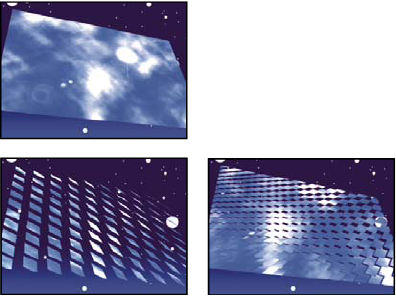
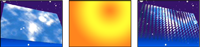
Apply Card Dance to the layer to use for the front of the cards. To set the view, use the rotation or perspective controls, or match the perspective of the effect in any scene by corner-pinning.
For example, select a vertical grayscale gradient layer (black on top, white on bottom) from the Gradient Layer 1 menu, and then select Intensity 1 from the X Rotation Source menu. Card Dance uses the intensity of the gradient to animate the x-axis rotation of the cards. It assigns a numeric value to the center pixel of each card on the gradient layer, based on the pixel’s intensity. Pure white equals 1, pure black equals –1, and 50% gray equals 0. Card Dance then multiplies that value by the X Rotation Multiplier value and rotates each card that amount. If X Rotation Multiplier is set to 90, the cards in the top row rotate almost 90° backward, the cards in the bottom row rotate almost 90° forward, and cards in middle rows rotate by lesser amounts. Cards in the 50% gray area don’t rotate at all.
If you want half of the cards in a layer to come in from the right, and the other half to come in from the left, create a gradient layer that is half black and half white. Set the gradient as the source for X Position, and set X Position Multiplier to 5, and animate it to 0. The cards in the black area initially appear at the left, and the cards in the white area initially appear at the right.
 Rows, Columns, Layer, and Order controls
- Rows & Columns
- Specifies the interaction of the numbers of rows and columns. Independent makes both the Rows and Columns sliders active. Columns Follows Rows makes only the Rows slider active. If you choose this option, the number of columns is always the same as the number of rows.
- Rows
- The number of rows, up to 1000.
- Columns
-
The number of columns, up to 1000, unless Columns Follows
Rows is selected.
Note: Rows and columns are always evenly distributed across a layer, so unusually shaped rectangular tiles don’t appear along the edges of a layer—unless you use an alpha channel.
- Back Layer
-
The layer that appears in segments on the backs of the cards.
You can use any layer in the composition; its Video switch
 can
even be turned off. If the layer has effects or masks, precompose
the layer first.
can
even be turned off. If the layer has effects or masks, precompose
the layer first.
- Gradient Layer 1
- The first control layer to use to make the cards dance. You can use any layer. Grayscale layers produce the most predictable results. The gradient layer acts as a displacement map for animating the cards.
- Gradient Layer 2
- The second control layer.
- Rotation Order
- The order in which the cards rotate around multiple axes when using more than one axis for rotation.
- Transformation Order
- The order in which the transformations (scale, rotation, and position) are performed.
Position, Rotation, and Scale controls
Position (X, Y, Z), Rotation (X, Y, Z), and Scale (X, Y) specify the transformation properties you want to adjust. Because Card Dance is a 3D effect, you can control these properties separately for each axis of the cards. However, because the cards themselves are still 2D, they have no inherent depth—hence the absence of z scaling.
- Source
- Specifies the gradient layer channel you want to use to control the transformation. For example, select Intensity 2 to use the intensity from Gradient Layer 2.
- Multiplier
- The amount of transformation applied to the cards.
- Offset
- The base value from which the transformation begins. It is added to the transformation value (a card’s center pixel value times the Multiplier amount) so that you can start the transformation from some place other than 0.
Camera System and Camera Position controls
- Camera System
- Specifies whether to use the effect’s Camera Position properties, the effect’s Corner Pins properties, or the default composition camera and light positions to render 3D images of the cards.
- X Rotation, Y Rotation, Z Rotation
- Rotate the camera around the corresponding axis. Use these controls to look at the cards from the top, side, back, or any other angle.
- X, Y Position
- Where the camera is positioned along the x and y axes.
- Z Position
- Where the camera is positioned along the z axis. Smaller numbers move the camera closer to the cards, and larger numbers move the camera away from the cards.
- Focal Length
- The zoom factor. Smaller numbers zoom in.
- Transform Order
- The order in which the camera rotates around its three axes, and whether the camera rotates before or after it is positioned using the other Camera Position controls.
Corner Pins controls
Corner Pinning is an alternative camera control system. Use it as an aid for compositing the result of the effect into a scene on a flat surface that is tilted with respect to the frame.
- Upper Left Corner, Upper Right Corner, Lower Left Corner, Lower Right Corner
- Where to attach each of the corners of the layer.
- Auto Focal Length
- Controls the perspective of the effect during the animation. When Auto Focal Length is deselected, the focal length you specify is used to find a camera position and orientation that positions the corners of the layer at the corner pins. If this isn’t possible, the layer is replaced by its outline, drawn between the pins. When Auto Focal Length is selected, the focal length required to match the corner points is used, if possible. If not, it interpolates the correct value from nearby frames.
- Focal Length
- Overrides the other settings if the results you’ve obtained aren’t what you need. If you set the Focal Length to something that doesn’t correspond to what the focal length would be if the pins were actually in that configuration, the image may look unusual (strangely sheared, for example). But if you know the focal length that you are trying to match, this is the easiest way to get correct results.