

Numbers effect
The Numbers effect generates random or sequential numbers in different formats, such as decimal number, dates, and timecode—even the current date and time (at render time). The maximum offset for sequential numbers is 30,000.
Use text layers for greater control over text formatting and text animation. (See Text.)
 Apply the Current Time Format animation preset
to a text layer to show the current time in the format corresponding
to the project’s time display style.
Apply the Current Time Format animation preset
to a text layer to show the current time in the format corresponding
to the project’s time display style.This effect works with 8-bpc color.
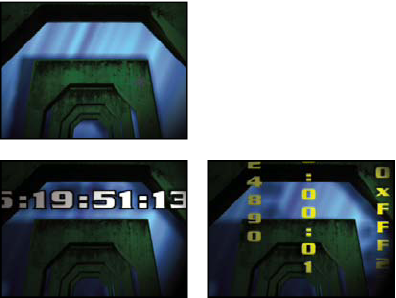
Original (top left); after applying the Numbers effect (bottom
left); and after setting Type to Numbers, Time, and Hexadecimal
on three different layers (bottom right)
The following options and values are available in the Font Style dialog box: Font, Style, Direction, and Alignment. To open this dialog box again, click Options at the top of the effect’s entry in the Effect Controls panel.
- Type
-
The numbering system:
- Number
- Decimal numbers.
- Number [Leading Zeros]
- Decimal numbers with five digits to the left of the decimal point.
- Timecode [30], Timecode [25], and Timecode [24]
- Standard non-drop-frame timecode formats (XX:XX:XX:XX) using the stated frame rate. The timecode types use the layer’s current time as the base.
- Time
- Hours and minutes. If you also select Current Time/Date, the Value/Offset/Random Max value is ignored. If you select Random, the time is bounded by 0 (12:00 AM) and the slider value.
- Numerical Date, Short Date, and Long Date
-
If you don’t also select Current Time/Date, the Value/Offset/Random
Max is the number of days since January 1, 1995 (0 on the slider
corresponds to January 1, 1995). If you do select Current Time/Date,
Value/Offset/Random Max is the number of days since the current date
(0 on the slider corresponds to the current date). If you select
Random, the date is bounded by 0 (either the current date or January
1, 1995) and the slider value.
Note: Leap years are taken into consideration. Note that on some Mac operating systems, the clock starts on January 1, 1904, and doesn’t go beyond February 6, 2040.
- Hexadecimal
- Base-16 numbers (digits from 0 to F). Hexadecimal numbers increment by 0x1 for every 0.0000125 that the Value/Offset/Random Max value increases, and increments by 0x10000 for every 1.0 that the Value/Offset/Random Max value increases. If you select Random, the number is bounded by 0 and the Value/Offset/Random Max value.
- Random Values
- Random values limited by the Value/Offset/Random Max value. If Value/Offset/Random Max is 0, values are random across their maximum possible range.
- Value/Offset/Random Max
- Varies based on the chosen type and whether or not Random Values is selected.
- Decimal Places
- Specifies the number of places to the right of the decimal point.
- Current Time/Date
- Select for time and date numbers to be based on the current time and date.
- Position
- The position of the numbers on the layer.
- Display Options
- Specifies the use of a fill or stroke or a combination of both on the text. Fill Only fills the characters with a color. Stroke Only strokes the edges of the characters with a color. Fill Over Stroke overlaps the fill color onto the stroke color. Stroke Over Fill overlaps the stroke color onto the fill color.
- Size
- Size of the characters.
- Tracking
- Average distance between characters.
- Proportional Spacing
- Numbers use proportional spacing instead of monospacing.
- Composite On Original
- Text is composited on top of the original image. If Composite On Original isn’t selected, the original image isn’t visible.