

Move the current-time indicator to a keyframe
After you
set the initial keyframe for a property, After Effects displays
the keyframe navigator, which you can use to move from keyframe
to keyframe or to set or remove keyframes. When the keyframe navigator
box is filled with a yellow diamond  , the
current-time indicator lies precisely at a keyframe for that layer
property. When the keyframe navigator box is not filled
, the
current-time indicator lies precisely at a keyframe for that layer
property. When the keyframe navigator box is not filled  , the
current-time indicator lies between keyframes.
, the
current-time indicator lies between keyframes.
 To
detach the keyframe navigator from the A/V Features column to function
as its own column, choose Column > Keys from the Timeline
panel menu.
To
detach the keyframe navigator from the A/V Features column to function
as its own column, choose Column > Keys from the Timeline
panel menu.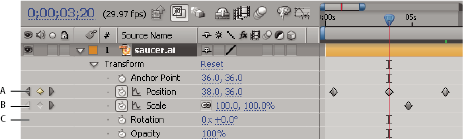
Keyframe navigator in Timeline panel
- A.
- Keyframe at current time
- B.
- No keyframe at current time
- C.
- No keyframes for layer property
- To move to the next or previous keyframe, click a keyframe navigator arrow.
- To snap to a keyframe or marker, Shift-drag the current-time indicator.
- To move to the next or previous visible item in the time ruler (keyframe, marker, or work area end), press K or J.