

Modify Bezier direction handles
In the Graph Editor, keyframes that use Bezier interpolation have direction handles attached to them. You can retract, extend, or rotate the direction handles to fine-tune the Bezier interpolation curve.
Retracting a direction handle makes a tighter, sharper Bezier curve. Extending a direction handle makes a larger, smoother Bezier curve. By default, when you retract or extend a direction handle, the opposite handle on the keyframe moves with it. Splitting direction handles makes the two direction handles attached to a keyframe behave independently.
- To manipulate the direction handles of two neighboring
keyframes simultaneously, drag the value graph segment between the
keyframes.
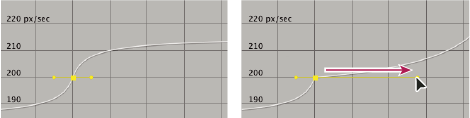 Modifying a Bezier direction handle