Hide, isolate, and change the appearance of parts
Some 3D models are composed of individual parts. You can use the Model Tree to hide or isolate parts, zoom in to parts, or make parts transparent.
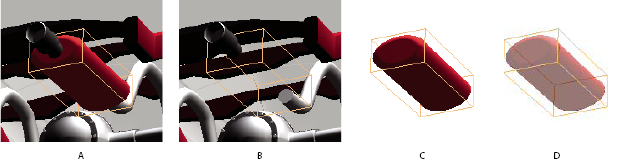
- A.
- Selected part
- B.
- Hidden part
- C.
- Isolated part
- D.
- Transparent part
- In the 3D model, use the Hand tool to click the part you want to manipulate. If a preference setting prevents you from using the Hand Tool, use the Object Data Tool (Tools > Object Data > Object Data Tool) to select parts. Or, select the part in the Model Tree list.
- From the Options menu in the top pane of the Model Tree,
choose any of the following:
Option Description Model Render Mode Changes the surface appearance of the entire 3D model according to the item you select on the submenu: Transparent Bounding Box, Solid, Transparent, Solid Wireframe, and so on.
Show All Parts Displays the entire 3D model.
Display Bounding Box Displays the box that encloses the 3D model.
Set Bounding Box Color Changes the color of the bounding box. Choose this option, select a color, and then click OK.
Note: The Hide, Isolate, Zoom To Part, and Transparent options appear on the Options menu only when a multi-part 3D model is selected. If the 3D model has only one part, the Export As XML option appears at the top of the menu instead of the bottom.Hide Displays the model without showing the selected parts. You can also select and deselect check boxes in the top section of the Model Tree to hide and show different parts.
Isolate Displays only the selected part, hiding all others.
Zoom To Part Changes the center focus from the entire 3D model to an individual part. This is especially useful when rotating the part, allowing it to rotate around its own center focus rather than that of the entire model.
Transparent Displays a see-through version of the selected part.
Export As XML Creates a separate file of either Whole Tree or Current Node of the 3D model.