Log in to and out of the Version Cue Administration utility
When you install Version Cue on your computer, Version Cue automatically creates a default user login ID with administrator privileges. You should change the password for this default user login, as it is publicly available for initial installation and setup. Until you change the default password, the default user login ID can only be used directly from the computer the Version Cue workspace is located on, not across a network. If Version Cue is installed on your computer, you can start using the web-based Version Cue Administration utility with the Version Cue default login ID (system) and password (system).
Users working in a group with a login ID and password can log in to the Version Cue Administration utility. The tasks that workgroup users can perform are limited by the privileges assigned to their Version Cue login ID by the administrator. However, users whose access level is set to None can’t log in to the Version Cue Administration utility.
You can display the Version Cue Administration login web page in the following ways:
-
By opening the Version Cue preferences and clicking the Advanced Administration button.
-
By clicking the Advanced Administration button in an Adobe Creative Suite component or in Acrobat 8.
-
By typing the IP address of the Version Cue Workspace directly into a web browser.
-
By selecting Advanced Administration from the Version Cue system tray icon (Windows) or the Version Cue menu (Mac OS).
 Log in to Version Cue Administration
from an Adobe Creative Suite component or from Acrobat 8
Log in to Version Cue Administration
from an Adobe Creative Suite component or from Acrobat 8
- Choose File > Open, and click Use Adobe Dialog.
- Select the Version Cue Workspace you want to administer.
- Choose Edit Properties from the Tools menu
 .
. - Click Advanced Administration in the Edit Properties dialog box.
- Type your assigned Version Cue login ID and password in the text boxes. (The default for both the ID and password is system.)
- Click Log In.
Log in to Version Cue Administration
from a web browser
Log in to Version Cue Administration
from the Version Cue Preferences dialog box
- Do one of the following:
-
(Windows) Double-click the Version Cue icon in the system tray and click Advanced Administration.
-
(Windows) Right-click the Version Cue icon in the system tray and then choose Version Cue CS2 Preferences.
 On Windows, double-click the Version Cue icon to open preferences dialog box.
-
(Mac OS) Click the Version Cue icon at the top of the screen, and then choose Advanced Administration from the menu.
-
(Mac OS) Control-click the Version Cue icon and choose Version Cue CS2 Preferences.
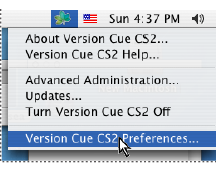 On Mac OS, choose Version Cue CS2 Preferences to open preferences dialog box.
-
- Type your assigned Version Cue login ID and password in the text boxes. (The default for both the ID and password is system.)
- Click Log In.
 Click Log Off at the top of the
page.
Click Log Off at the top of the
page.