Draw with the Pencil tool
To draw lines and shapes, use the Pencil tool, in much the same way that you use a real pencil to draw. To apply smoothing or straightening to the lines and shapes as you draw, select a drawing mode for the Pencil tool.
-
Select the Pencil tool
 .
.
- Select Window > Properties > Properties and select a stroke color, line weight, and style.
-
Select
a drawing mode under Options in the Tools panel:
-
To draw straight lines and convert approximations of triangles, ovals, circles, rectangles, and squares into these common geometric shapes, select Straighten
 .
. -
To draw smooth curved lines, select Smooth
 .
. -
To draw freehand lines with no modification applied, select Ink
 .
.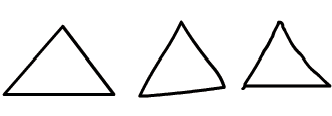 Lines drawn with Straighten, Smooth, and Ink mode, respectively.
-
- To draw with the Pencil tool, Shift-drag to constrain lines to vertical or horizontal directions, click the Stage, and drag.
Related Information
