Add learning interactions to a document (no quiz template)
To add learning interactions to a Flash document that does not use a quiz template, place stand-alone learning interactions in the Timeline in a single frame, sequential frames (for example, 10 questions in 10 sequential frames), or labeled frames.
-
Select Window > Common Libraries >
Learning Interactions.
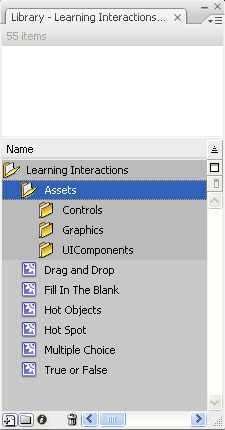
The Learning Interactions library includes six types of learning interaction movie clips: Drag And Drop, Fill In The Blank, Hot Objects, Hot Spot, Multiple Choice, and True Or False. In addition, the library contains a folder called Assets that contains subfolders called Controls, Graphics, and UIComponents. These folders are used for customizing learning interactions.
Note: Watch the frame count across layers as you add and
remove keyframes. All layers must end at the same frame number along
the Timeline so that the frame count is the same in all layers.
Related Information
