Configure a Hot Object interaction

The Hot Object interaction accepts up to eight hot objects. The default sample uses six hot objects.

  1. If you are not using a quiz template, place the learning interaction on the Stage. If you are using a quiz template, select the frame on the Interactions layer that contains the Hot Object interaction (Frame 5, if you did not add or remove keyframes).
  2. Break the movie clip apart (Modify > Break Apart), display the Component inspector, and type the interaction ID and the question.
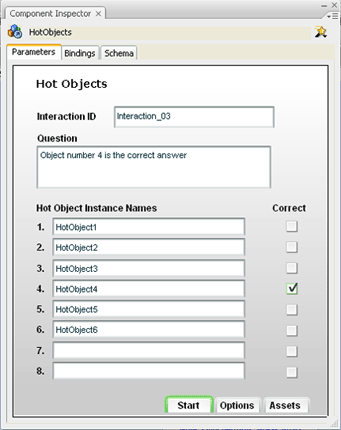
  3. For each object, select or deselect Correct to specify whether the object is considered a correct or incorrect response when the user clicks it. Multiple correct selections are allowed.
  4. Select each instance of the Hot Object interaction on the Stage (you can delete the placeholder instances and place your own movie clip instances on the Stage). Use the Property inspector to give each instance the same instance name that you specified in the Component inspector.

  This page on the Web