Draw rectangles and ovals
The Oval and Rectangle tools let you create these basic geometric shapes, and apply strokes, fills, and specify rounded corners. In addition to the Merge and Object drawing model, the Oval and Rectangle tools also provide the Primitive Object drawing mode.
 Draw primitive rectangles
-
To select the Rectangle Primitive
tool, click and hold the mouse button on the Rectangle tool
 , and
select the Rectangle Primitive tool
, and
select the Rectangle Primitive tool  from
the pop-up menu.
from
the pop-up menu.
-
With the primitive rectangle selected on the Stage, you
can use the controls found in the Property inspector to further
modify the shape, or specify fill and stroke colors.
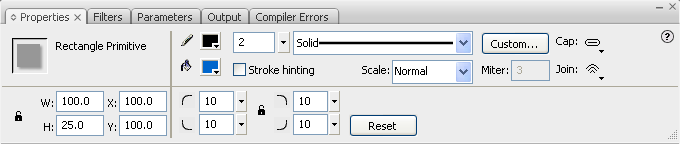 Properties for a rectangle primitive
The Property inspector controls specific to the Rectangle Primitive tool are:
Rectangle Corner Radius Controls Lets you specify the corner radiuses for the rectangle. You can enter a numerical value for the inner radius in the box, or click the slider and interactively adjust the size of the radius. Entering a negative value creates an inverse radius. You can also deselect the constrain corner radius icon, and adjust each corner radius individually.
Reset Resets all of the Rectangle Primitive tool’s controls, and returns the primitive rectangle shape drawn on the stage to its initial size and shape.
Draw primitive ovals
-
Click and hold the mouse button
on the Rectangle tool , and
select the Oval Primitive tool
 .
.
-
With the primitive oval selected on the Stage, you can
use the controls found in the Property inspector to further modify
the shape, or specify fill and stroke colors.
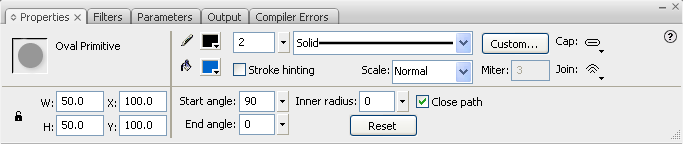 Properties for an oval primitive
The Property inspector controls specific to the Primitive Oval tool are:
Start angle and End angle Let you specify the angle of the start and end points of the oval. Using these controls, you can easily modify the shape of ovals and circles into pie slices, half circles, and other creative shapes.
Inner radius Lets you specify an inner radius (or oval) within the oval. You can either enter a numerical value for the inner radius in the box, or click the slider and interactively adjust the size of the inner radius. The numerical values you can enter for the inner radius range from 0 to 99, and represent the percentage of the oval’s fill that is removed.
Close path Lets you specify whether the path (or paths, if you are specifying an inner radius) of the oval is closed. If you specify an open path, no fill is applied to the resulting shape, only the stroke is drawn. Close path is selected by default.
Reset Resets all of the Oval Primitive tool’s controls, and returns the primitive oval shape drawn on the stage to its initial size and shape.
Draw ovals and rectangles
The Oval and Rectangle tools create these basic geometric shapes.
-
To select the Rectangle tool or
Oval tool
 , click
and hold the mouse button on the Rectangle tool and drag.
, click
and hold the mouse button on the Rectangle tool and drag.
