Using ActionScript 3.0 Components 


Using ActionScript 3.0 Components |
|
|
|
| Working with Components > Working with a DataProvider > Creating a DataProvider > Using ActionScript | |||
|
|||
|
|||
|
|||
You can create a DataProvider by creating the data in an Array or XML object and providing the object as the value parameter to the DataProvider constructor.
|
NOTE |
In ActionScript 3.0, you cannot assign an Array or XML object directly to a dataProvider property because the property is defined as a DataProvider object and can only receive an object of the DataProvider type. |
The following example populates a List component, which is a single column of rows, with the names of several children and their birthdays. The example defines the list in the items Array and supplies it as the parameter when it creates the DataProvider instance (new DataProvider(items)) and assigns it to the dataProvider property of the List component.
import fl.controls.List;
import fl.data.DataProvider;

var aList:List = new List();
var items:Array = [
{label:"David", data:"11/19/1995"},
{label:"Colleen", data:"4/20/1993"},
{label:"Sharon", data:"9/06/1997"},
{label:"Ronnie", data:"7/6/1993"},
{label:"James", data:"2/15/1994"},
];
aList.dataProvider = new DataProvider(items);
addChild(aList);
aList.move(150,150);
The Array consists of pairs of label and value fields. The label fields are label and data and the value fields are the children's names and their birthdays. The label field identifies the content that appears in the List, which in this case is the names of the children. The resulting List looks like this:
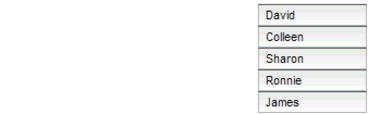
A List populated by a DataProvider
The value of the data field is available when the user selects an item in the list by clicking it and causing a change event. The following example adds a TextArea (aTa) and an event handler (changeHandler) to the preceding example to display the child's birthday when a user selects a name in the List.
import fl.controls.List;
import fl.controls.TextArea;
import flash.events.Event;
import fl.data.DataProvider;

var aList:List = new List();
var aTa:TextArea = new TextArea();
var items:Array = [
{label:"David", data:"1/19/1995"},
{label:"Colleen", data:"4/20/1993"},
{label:"Sharon", data:"9/06/1994"},
{label:"Ronnie", data:"7/6/1993"},
{label:"James", data:"2/15/1994"},
];
aList.dataProvider = new DataProvider(items);

addChild(aList);
addChild(aTa);

aList.move(150,150);
aTa.move(150, 260);

aList.addEventListener(Event.CHANGE, changeHandler);

function changeHandler(event:Event):void {
    aTa.text = event.target.selectedItem.data;
};
Now when a user selects a child's name in the List, the child's birthday displays in the TextArea as shown in the following illustration. This is accomplished by the changeHandler() function when it sets the text property of the TextArea (aTa.text) to the value of the data field in the selected item (event.target.selectedItem.data). The event.target property is the object that triggered the event, which in this case is the List.
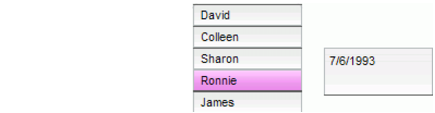
Displaying the data field from a List's DataProvider
You can include data other than text in a DataProvider. The following example includes MovieClips in a DataProvider that supplies data to a TileList. It builds the DataProvider by calling addItem() to add each item after it creates the MovieClip, a colored box.
import fl.data.DataProvider;
import flash.display.DisplayObject;

var aBox:MovieClip = new MovieClip();
var i:uint = 0;
var colors:Array = new Array(0x00000, 0xFF0000, 0x0000CC, 0x00CC00, 0xFFFF00);
var colorNames:Array = new Array("Midnight", "Cranberry", "Sky", "Forest", "July");
var dp:DataProvider = new DataProvider();
for(i=0; i < colors.length; i++) {
    drawBox(aBox, colors[i]);    // draw box w next color in array
    dp.addItem( {label:colorNames[i], source:aBox} );
}
aTl.dataProvider = dp;
aTl.columnWidth = 110;
aTl.rowHeight = 130;
aTl.setSize(280,150);
aTl.move(150, 150);
aTl.setStyle("contentPadding", 5);

function drawBox(box:MovieClip,color:uint):void {
            box.graphics.beginFill(color, 1.0);
            box.graphics.drawRect(0, 0, 100, 100);
            box.graphics.endFill();
You can also use XML data (instead of an array) to populate a DataProvider object. For example, the following code stores data in an XML object named employeesXML, and then passes that object as the value parameter of the DataProvider() constructor function:
import fl.controls.DataGrid;import fl.data.DataProvider;var aDg:DataGrid = new DataGrid(); addChild(aDg);var employeesXML:XML =
<employees>
<employee Name="Edna" ID="22" /><employee Name="Stu" ID="23" /></employees>;var myDP:DataProvider = new DataProvider(employeesXML);aDg.columns = ["Name", "ID"];
aDg.dataProvider = myDP;
You can provide data as attributes of the XML data, as in the previous code, or as properties of the XML data, as in the following code:
var employeesXML:XML =<employees><employee><Name>Edna</Name><ID>22</ID></employee><employee><Name>Stu</Name><ID>23</ID></employee></employees>;
The DataProvider also has a set of methods and properties that allow you to access and manipulate it. You can use the DataProvider API to add, remove, replace, sort, and merge items in a DataProvider.
|
|||
|
|||
|
|||
|
|
|
|