Using ActionScript 3.0 Components 


Using ActionScript 3.0 Components |
|
|
|
| Working with Components > Working with a DataProvider > Creating a DataProvider > Using the dataProvider parameter | |||
|
|||
|
|||
|
|||
You can create a simple data provider for the ComboBox, List, and TileList components by clicking the dataProvider parameter on the Parameters tab of the Property inspector or the Component inspector. The following illustration shows the parameter in the Property inspector.
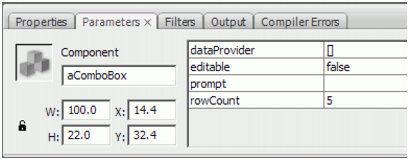
dataProvider parameter in the Property inspector
If you double-click the value cell, which initially shows an empty Array, you will open the Values dialog box, which allows you to enter multiple label and data values to create the data provider.
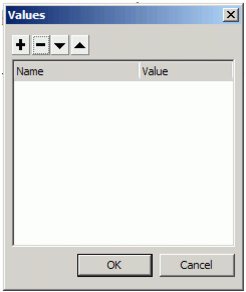
Values dialog box for dataProvider
Click the plus sign to add an item to the dataProvider. Click the minus sign to delete an item. Click the up arrow to move a selected item up in the list or click the down arrow to move a selected item down in the list. The following illustration shows a Values dialog box that creates a list of children's names and their birthdays.
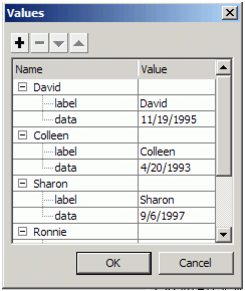
Values dialog box with data
The Array you create consists of pairs of label and value fields. The label fields are label and data and the value fields are the children's names and their birthdays. The label field identifies the content that appears in the List, which in this case is the names of the children. The resulting ComboBox looks like this:
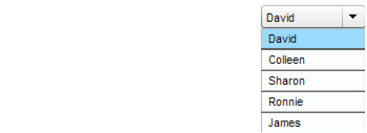
The ComboBox populated by the DataProvider
When you finish adding data, click OK to close the dialog box. The Array in the dataProvider parameter is now populated with the items that you created.

dataProvider parameter with data
You can access the label and data values that you created by using ActionScript to access the component's dataProvider property.
|
|||
|
|||
|
|||
|
|
|
|