Getting Started with Flash Lite 1.x 


Getting Started with Flash Lite 1.x |
|
|
|
| Flash Lite Overview > Flash Lite authoring features | |||
|
|||
|
|||
|
|||
This section discusses the features in Flash designed specifically for Flash Lite developers. With the exception of the device templates feature, the following features are only available when your document's Version setting on the Flash tab of the Publish Setting dialog box is set to either Flash Lite 1.0 or Flash Lite 1.1. For information on how to specify your document's SWF version, see "Setting publish options for the Flash SWF file format" in Using Flash.
Adobe Device Central lets you test your content as it will run and appear on an actual device. It also lets you select a different test device, view information about your application, and set emulator debug output options. Different devices support different media types (for example, different types of device sound formats) as well as different Flash Lite content types, such as stand-alone player, screensaver, or browser. When you preview your application, the emulator mimics the features available to the selected test device running as the selected content type.
For more information about Flash Lite content types, see About Flash Lite content types.
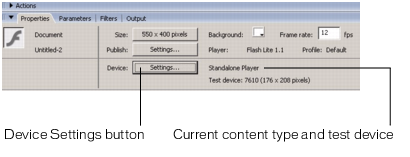
The Property inspector contains a section that provides information about your current device settings, as well as a button that lets you open the Device Settings dialog box. This button is active only when your document's Version setting on the Flash tab of the Publish Setting dialog box is set to Flash Lite 1.0 or Flash Lite 1.1.
Document templates provide a starting point for you to create different types of Flash Lite content for different categories of devices. For more information, see Using Flash Lite document templates.
|
|||
|
|||
|
|||
|
|
|
|