Developing Flash Lite 1.x Applications 


Developing Flash Lite 1.x Applications |
|
|
|
| Working with Text and Fonts > Using input text fields > Input text fields and the focus rectangle | |||
|
|||
|
|||
|
|||
By default, Flash Lite draws a yellow rectangle around the input text field that has keypad focus, as the following image shows:
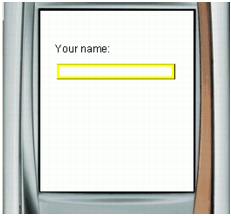
You can disable the focus rectangle by setting the global _focusRect property to false. However, in that case, the user won't be able to see that the text field has keypad focus and won't know to press the Select key on their device. Adobe recommends that you do not disable the focus rectangle when using input text fields.
For more information about controlling the behavior of the yellow focus rectangle, see
About the focus rectangle and _focusrect in Flash Lite 1.x ActionScript Language Reference.
|
|||
|
|||
|
|||
|
|
|
|