Developing Flash Lite 1.x Applications 


Developing Flash Lite 1.x Applications |
|
|
|
| Working with Text and Fonts > About text in Flash Lite > Assigning a variable name to a text field | |||
|
|||
|
|||
|
|||
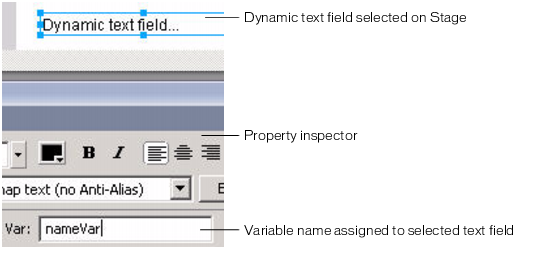
You can associate dynamic and input text fields with an ActionScript variable name, which lets you get or set the contents of the text using ActionScript.
 To associate a variable name with a dynamic or input text field:
For more information about using Flash Lite document templates, see Using Flash Lite document templates in Getting Started with Flash Lite 1.x.
The value that you enter must be a valid variable identifier--the first character must be a letter, underscore (_), or dollar sign ($), and each subsequent character must be a letter, number, underscore, or dollar sign.
nameVar = "George Washington"
For another example of using dynamic text fields, see Text field example application.
|
|||
|
|||
|
|||
|
|
|
|