Developing Flash Lite 2.x and 3.0 Applications
Select a font rendering method for a text field
- Select a text field on the Stage.
- In the Property inspector, select one of the following options from the Font Rendering Method pop-up menu:
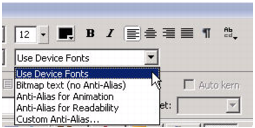
- Select Use Device Fonts to have Flash Lite use a font that is available on the device. No font data is embedded in the published SWF file.
- Select Bitmap Text (No Anti-Alias) to have Flash Lite align font outlines along pixel boundaries, which makes small text appear crisp and clear. This option requires that Flash embed font outlines in the published SWF file. (See Embedding font outlines in SWF files.)
- Select Anti-Alias For Animation to have Flash Lite anti-alias the text field's font according to the current rendering quality setting (see Flash Lite rendering quality and anti-aliased text). This option requires that Flash embed font outlines in the published SWF file.

