

Using input text fields
Flash Lite 2.1 and later supports inline text input. This features lets users edit text fields directly in the Flash Lite application, rather than in a separate text input box as in earlier versions. For example, the following figure shows how an inline input text field appears on a Series 60 device from Nokia:
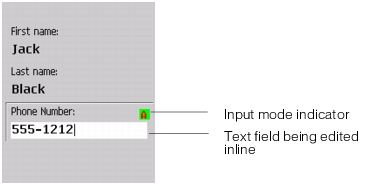
Flash Lite 2.1 and later supports inline text input for Latin and Asian languages but not complex languages, which include right-to-left languages such as Arabic, Hebrew, Urdu, Farsi, and Yiddish, as well as some Asian languages.
On devices running Flash Lite 2.0 and Flash Lite 1.1, and in the Adobe Device Central emulator for all versions, users edit the contents of input text fields using a modal dialog box that appears over the Flash Lite content. For example, the following figure shows an example of a text input dialog box on a Symbian™ Series 60 device running Flash Lite 2.0:
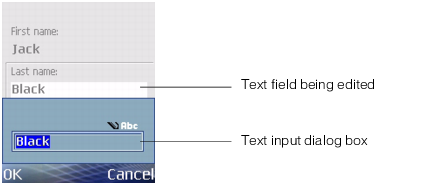
In general, existing Flash Lite 2.0 and Flash Lite 1.1 applications can work without modification in Flash Lite 2.1 and later. In place of the modal dialog box, users can simply edit input text fields inline. However, legacy content should be re-authored to use the features that are available only in Flash Lite 2.1 and later, such as the ability to set text selections or the activateTextField command.
For more information about the input text dialog box, see "Using the device's input text dialog box (Flash Lite 2.0)" on page 40.