

About the focus rectangle
By default, Flash Lite draws a yellow rectangle around the button or input text field that has focus. Movie clips are also included if their tabEnabled property is set to true, or if they have event handlers associated with them and their tabEnabled property is not set to false.
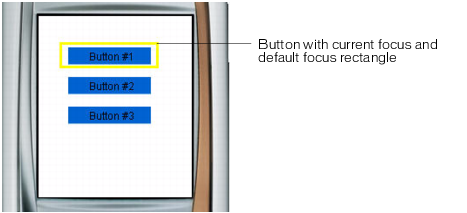
The focus rectangle lets the user know which object on the screen will respond when the user presses the device's select key. For example, the following image shows the focus rectangle drawn around a button that has the current keypad focus:
For buttons and movie clips, the focus rectangle's bounding box is determined by the object's hit area--the invisible region that (in Flash desktop applications) defines the part of the button or movie clip that responds to mouse clicks. For input text fields, the focus rectangle's bounding box is determined by the text field's dimensions.
You can customize the color of the focus rectangle or disable it. For more information, see Customizing the focus rectangle.