

Keys supported by Flash Lite
In addition to the alphanumeric keys available on standard telephones, most mobile devices feature a navigation keypad, which let users navigate and select items on the device screen, and two (or more) soft keys. A device's soft keys are multifunctional keys that use the screen to identify their purpose at any moment.
A typical navigation keypad has four navigation keys (up, down, left, and right) and a select key (typically located at the center of the keypad). Different applications can use these keys in different ways. For example, a game might use the navigation keys to let the user move a character on the screen, and then use the select key to perform another action, such as make the character jump.
The following images show the most common keys on a generic keypad and on an actual device:
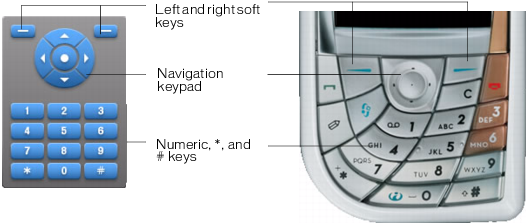
Not all devices and Flash Lite content types support all these keys. For example, devices that support two-way navigation don't support the left and right navigation keys (see Default navigation modes). Also, not all devices have access to the device's soft keys.
Flash Lite supports the following keys on mobile devices:
|
Description |
Keys |
Availability |
|---|---|---|
|
Numeric, *, # |
0, 1, 2, 3, 4, 5, 6, 7, 8, 9, *, # |
All devices |
|
Five-way keypad |
Select, up, and down |
All devices |
|
|
Left and right |
Devices that support four-way navigation only (see Default navigation modes) |
|
Soft keys |
Left and right |
Devices that support the SetSoftKeys command |
|
|
SOFT3 - SOFT12 keys |
Devices that have more than two soft keys |
|
Keyboard keys |
!, ", #, $, %, &, ', (, ), *, +, ,, -, ., /, 0, 1, 2, 3, 4, 5, 6, 7, 8, 9, :, ;, <, +, >, ?, @, A, B, C, D, E, F, G, H, I, J, K, L, M, N, O, P, Q, R, S, T, U, V, W, X, Y, Z, [, \, ], ^, _, ', a, b, c, d, e, f, g, h, i, j, k, l, m, n, o, p, q, r, s, t, u, v, w, x, y, z, {, |, }, ~, Backspace |
Devices that have a QWERTY keyboard |
The following System.Capabilities properties allow you to determine the navigation and selection options available on a device:
- hasMappableSoftKeys
- softKeyCount
- has4WayKeyAS
- hasQWERTYKeyboard
- hasStylus
- hasMouse
For more information about the System.Capabilites class, see Flash Lite 2.x and 3.0 ActionScript Language Reference.