ActionScript 2.0 Components Language Reference 


ActionScript 2.0 Components Language Reference |
|
|
|
| Slide class > Slide.overlayChildren | |||
|
|||
|
|||
|
|||
Flash Player 6 (6.0.79.0).
Flash MX Professional 2004.
mySlide.overlayChildren
Property; determines whether child slides of mySlide remain visible when navigating from one child slide to the next. When this property is true, the previous slide remains visible when control passes to its next sibling slide; when this property is false, the previous slide is invisible when control passes to its next sibling slide.
Setting this property to true is useful, for example, when a given slide contains several child "bullet point" slides that are revealed separately (using transitions, perhaps), but all need to remain visible as new bullet points appear.
|
NOTE |
This property applies only to the immediate descendants of |
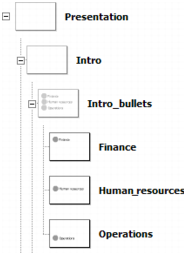
The Intro_bullets slide in the following illustration contains three child slides (Finance, Human_resources, and Operations) that each display a separate bullet point. By setting Intro_bullets.overlayChildren to true, each bullet slide remains on the Stage as the other bullet points appear.
|
|||
|
|||
|
|||
|
|
|
|