ActionScript 2.0 Components Language Reference 


ActionScript 2.0 Components Language Reference |
|
|
|
| Slide class | |||
|
|||
|
|||
|
|||
The Slide class corresponds to a node in a hierarchical slide presentation that you create in the Screen Outline pane in Adobe Flash CS3 Professional.
Note: The Screens feature has been deprecated in Flash CS3. You can open and edit existing Screens-based FLA files created in earlier versions of Flash, but you cannot create new Screens-based documents. Also, the Slide class is supported only if you are working in a document that specifies ActionScript 2.0 in its Publish Settings.
The Slide class extends the Screen class (see Screen class), and provides built-in navigation and sequencing capabilities between slides, as well as the ability to easily attach transitions between slides using behaviors. Slides maintain "state," so that when a user advances to an adjacent slide, the previous slide is hidden. For an overview of working with screens, see "Working with Screens" in Using Flash.
Note that you can only navigate to ("stop on") slides that don't contain any child slides ("leaf" slides). For example, consider the following illustration, which shows the contents of the Screen Outline pane for a sample slide presentation:
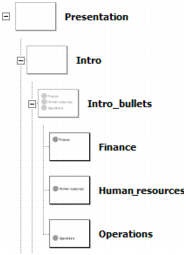
When this presentation starts, it will, by default, "stop" on the slide named Finance, which is the first slide in the presentation that doesn't contain any child slides.
Also note that child slides "inherit" the visual appearance (graphics and other content) of their parent slides. For example, in the above illustration, in addition to the content on the Finance slide, the user would also see any content on the Intro and Presentation slides.
|
NOTE |
The Slide class inherits from the Loader class, which lets you easily load external SWF or JPEG files into a given slide. This provides a way to make your slide presentations modular and reduce initial download time. For more information, see Loading external content into screens. |
|
|||
|
|||
|
|||
|
|
|
|