ActionScript 2.0 Components Language Reference 


ActionScript 2.0 Components Language Reference |
|
|
|
| Screen class > Loading external content into screens | |||
|
|||
|
|||
|
|||
The Screen class extends the Loader class (see Loader component), which lets you easily manage and load external SWF and JPEG files. The Loader class contains a contentPath property, which specifies the URL of an external SWF or JPEG file, or the linkage identifier of a movie clip in the library.
Using this feature, you can load an external screen tree (or any external SWF file) as a child of any screen node. This provides a useful way to make your screen-based media modular and divide it into separate SWF files.
For example, suppose you have a slide presentation in which three people are each contributing a single section. You could ask each presenter to create a separate slide presentation (SWF file). You would then create a "master slide presentation" that contains three placeholder slides, one for each slide presentation being created by the presenters. For each placeholder slide, you could point its contentPath property to one of the SWF files. The master slide presentation could be arranged as shown in the following illustration:
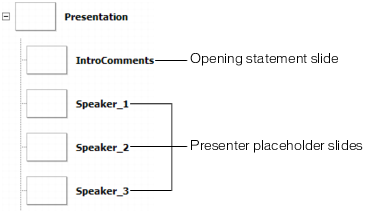
"Master" SWF file slide presentation structure
Suppose presenters provide you with three SWF files, speaker_1.swf, speaker_2.swf, and speaker_3.swf. You could easily assemble the overall presentation by setting the contentPath property of each placeholder slide, either using the Property inspector or ActionScript, as shown in the following code:
Speaker_1.contentPath = speaker_1.swf;
Speaker_2.contentPath = speaker_2.swf;
Speaker_3.contentPath = speaker_3.swf;
By default, when you set a slide's contentPath property while authoring in the Property inspector, or using ActionScript (as shown above), the specified SWF file loads as soon as the "master presentation" SWF file has loaded. To reduce initial load time, consider setting the contentPath property in an on(reveal) handler attached to each slide.
// Attached to Speaker_1 slide
on(reveal) {
    this.contentPath="speaker_1.swf";
}
Alternatively, you could set the slide's autoLoad property to false. Then you could call the load() method on the slide when the slide has been revealed. (The autoLoad property and the load() method are inherited from the Loader class.)
// Attached to Speaker_1 slide
on(reveal) {
    this.load();
}
The Loader class creates an internal movie clip named contentNode into which it loads the SWF or JPEG file specified by the contentPath property. This movie clip, in effect, adds an extra screen node between the "placeholder" slide (that you created in the "master" presentation above) and the first slide in the loaded slide presentation.
For example, suppose the SWF file created for the Speaker_1 slide placeholder (see above illustration) had the following structure, as shown in the Screen Outline pane:
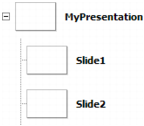
"Speaker 1" SWF file slide presentation structure
At runtime, when the Speaker 1 SWF file is loaded into the placeholder slide, the overall slide presentation would have the following structure:
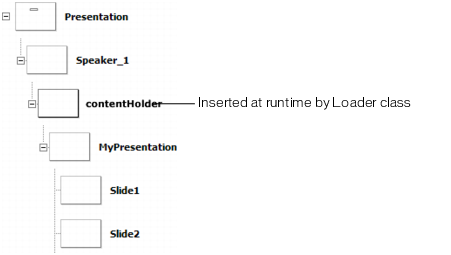
Structure of "master" and "speaker" presentation (runtime)
The properties and methods of the Screen, Slide, and Form classes "ignore" this contentHolder node as much as possible. That is, the slide named MyPresentation (along with its subslides) is part of the contiguous slide tree rooted at the Presentation slide, and is not treated as a separate subtree.
|
|||
|
|||
|
|||
|
|
|
|