ActionScript 2.0 Components Language Reference 


ActionScript 2.0 Components Language Reference |
|
|
|
| Form class > Using the Form class | |||
|
|||
|
|||
|
|||
Forms function as containers for graphic objects--user interface elements in an application, for example--as well as application states. You can use the Screen Outline pane to visualize the different states of an application that you're creating, where each form is a different application state. For example, the following illustration shows the Screen Outline pane for an example application designed using forms.
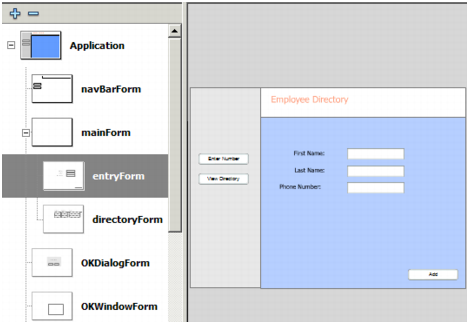
Screen Outline view of sample form application
This illustration shows the outline for a sample application called Employee Directory, which consists of several forms. The form named entryForm (selected in the above illustration) contains several user interface objects, including input text fields, labels, and a push button. The developer can easily present this form to the user by toggling its visibility (using the Form.visible property), while simultaneously toggling the visibility of other forms, as well.
Using the Behaviors panel you can also attach behaviors and controls to forms. For more information about adding transitions and controls to screens, see "Creating controls and transitions for screens with behaviors" in Using Flash.
Because the Form class extends the Loader class, you can easily load external content (a SWF or JPEG file) into a form. For example, the contents of a form could be a separate SWF file, which itself might contain forms. In this way, you can make your form applications modular, which makes maintaining the applications easier, and also reduces initial download time. For more information, see Loading external content into screens.
|
|||
|
|||
|
|||
|
|
|
|