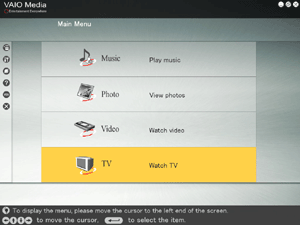
Use VAIO Media to watch television with your computer or from computers connected to your network.
If your server is running a preinstalled version of Windows XP Media Center Edition, you cannot watch television broadcasts via a direct connection to the antenna terminal on the computer. However, using this function you can watch the images from the external video input of the server.
The television function may not be available in some countries or regions.
|
Before Watching Television
- The computer receiving television signals through a built-in tuner is called a server. The computer that you use to watch television with VAIO Media is called a client. If the computer receiving the television signals is the one where you watch television, it is both a server and a client. For details about servers and clients, click here.
- Before you can watch television, you must configure the server and clients for use with VAIO Media.
 Preparing your Network for use with VAIO Media Preparing your Network for use with VAIO Media |
To watch television, click TV on the VAIO Media main menu.
VAIO Media begins searching for servers. When the search is complete, the results appear on the "Please select a server" screen.
Click the server receiving television signals and the television broadcast appears.
Depending on the status of the server that you are attempting to access, connection may not always be possible.

Hint
- If VAIO Media finds the server to which you were last connected when conducting its search, it will automatically connect with that server and begin playback of the television broadcast that it receives.
- The onscreen menus, lists, playback screens, etc., can be operated by keyboard or remote control. For details, see Keyboard & Remote Control Operations.


 Watching Television