

Fine-tune the speed of an effect
In the Effect Controls panel, you can use the Velocity graph to adjust motion or the rate of change for a value just before and just after a keyframe. Such adjustments can simulate real‑world motion. For example, you can change the motion of a clip so that it slows down just before a keyframe and then speeds up just after the keyframe. You can control the values approaching and leaving a keyframe together, or you can control each value separately.
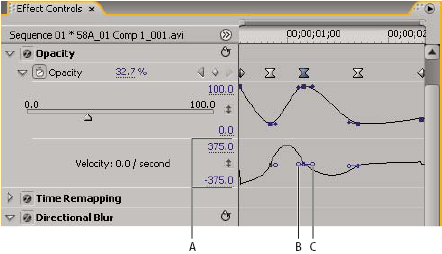
Velocity graph
- A.
- Speed controls
- B.
- Incoming direction handles
- C.
- Outgoing direction handles