

Drop Shadow effect
The Drop Shadow effect adds a shadow that appears behind the clip. The shape of the Drop Shadow is determined by the clip’s alpha channel.
When you add a drop shadow to a clip, a soft-edged outline of the clip’s alpha channel appears behind it, as if a shadow is cast on the background or underlying objects.
Unlike most other effects, Drop Shadow can create a shadow outside the bounds of the clip (the dimensions of the clip’s source).
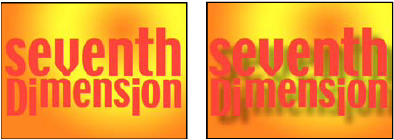
Original (left), and with effect applied (right)
To render the shadow without the image, select Shadow Only.
Note: Because Drop Shadow works best when it’s the last effect rendered,
apply this effect after applying all other effects. You can create
a more realistic‑looking shadow on animated clips by applying and
animating the Motion or Basic 3D effect prior to applying Drop Shadow
instead of animating the Fixed Motion effect because Fixed effects
are rendered after Standard effects.