

Create tab stops in titles
When you create text using the Horizontal Area Type or Vertical Area Type tools, you can apply tabs in much the same way as you would in a word‑processing program. Tabs are especially useful in creating professional‑looking rolling credits. You can set multiple tabs within a text box and press the Tab key to move the cursor to the next available tab stop. You can specify a different justification option at each tab stop.
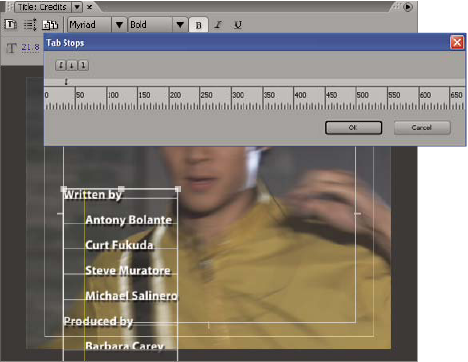
 Set and adjust a tab stop
- Choose Title > Tab Stops.
-
To create a tab stop with left‑justified text, click the Left Justify tab marker
 .
. -
To create a tab stop with center‑justified text, click the Center tab marker
 .
. -
To create a tab stop with right‑justified text, click the Right Justify tab marker
 .
.
-
 In the Tab Stops dialog box, drag
the tab up, down, or off the tab ruler.
In the Tab Stops dialog box, drag
the tab up, down, or off the tab ruler.