

Align and distribute objects in titles
The Title Actions panel includes buttons to arrange objects in the drawing area. You can align, center, and distribute objects along horizontal or vertical axes.
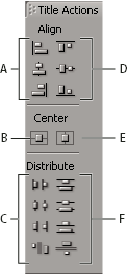
- A.
- Horizontal alignment buttons
- B.
- Vertical centering button
- C.
- Horizontal distribution buttons
- D.
- Vertical alignment buttons
- E.
- Horizontal centering button
- F.
- Vertical distribution buttons
 Center objects in titles
Align objects in titles
An alignment option aligns selected objects to the object that most closely represents the new alignment. For example, for right alignment, all selected objects align to the selected object that is farthest to the right.
- In the Titler, select two or more objects.
- In the Titler Actions panel, click the button for the type of alignment you want.
Distribute objects in titles
A distribution option evenly spaces selected objects between the two most extreme objects. For example, for a vertical distribution option, the selected objects are distributed between the highest and lowest selected objects.
When you distribute objects of different sizes, the spaces between objects may not be uniform. For example, distributing objects by their centers creates equal space between the centers—but different‑sized objects extend by different amounts into the space between objects. To create uniform spacing between selected objects, use the Horizontal Even Spacing or Vertical Even Spacing option.
- In the Titler, select three or more objects.
- In the Titler Actions panel, click the button for the type of distribution you want.