

Choose a display mode
You can display normal video, the video’s alpha channel, or one of several measurement tools.
 In the Source or Program Monitor, click the Output
button
In the Source or Program Monitor, click the Output
button  , or
click the panel menu and choose a display mode setting:
, or
click the panel menu and choose a display mode setting: - Composite Video
- Displays the normal video.
- Alpha
- Displays transparency as a grayscale image.
- All Scopes
- Displays a waveform monitor, vectorscope, YCbCr Parade, and RGB Parade.
- Vectorscope
- Displays a vectorscope that measures the video’s chrominance, which includes hue and saturation.
- YC Waveform
- Displays a standard waveform monitor, which measures the video’s luminance in IRE.
- YCbCr Parade
- Displays a waveform monitor that measures the Y, Cb, and Cr components of the video separately, in IRE.
- RGB Parade
- Displays a waveform monitor that measures the R, G, and B components of the video separately, in IRE.
- Vect/YC Wave/YCbCr Parade
- Displays a waveform monitor, vectorscope, and YCbCr Parade.
- Vect/YC Wave/RGB Parade
-
Displays a waveform monitor, vectorscope, and RGB Parade.
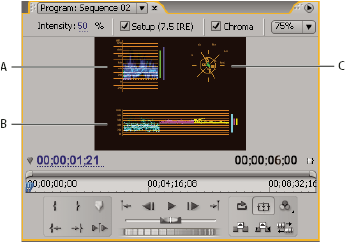 Program Monitor set to Vect/YC Wave/YCbCr Parade
- A.
- Waveform monitor
- B.
- YCbCr Parade
- C.
- Vectorscope
 To use the waveform monitor and vectorscope displays
most effectively, view them in a reference monitor that is ganged
to the Program Monitor. See Use a Reference Monitor.
To use the waveform monitor and vectorscope displays
most effectively, view them in a reference monitor that is ganged
to the Program Monitor. See Use a Reference Monitor.