

View safe zones in the monitors
Safe zone guides are for your reference and are not included in previews or export.
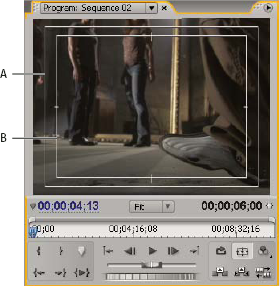
Safe zones in Program Monitor
- A.
- Action‑safe zone
- B.
- Title‑safe zone
 Click
the Safe Margins button
Click
the Safe Margins button  below
the Source or Program Monitor. Click the button again to remove
the safe zone guides.
below
the Source or Program Monitor. Click the button again to remove
the safe zone guides.
 The standard action‑ and title‑safe margins
are 10% and 20%, respectively. However, you can change the dimensions
of the safe zones in the Project Settings dialog box. (See Adjust project settings and presets.)
The standard action‑ and title‑safe margins
are 10% and 20%, respectively. However, you can change the dimensions
of the safe zones in the Project Settings dialog box. (See Adjust project settings and presets.)