

Work with submixes
A submix is a track that combines audio signals routed to it from specific audio tracks or track sends in the same sequence. A submix is an intermediate step between audio tracks and the master track. Submixes are useful if you want to work with a number of audio tracks in the same way. For example, you can use a submix to apply identical audio and effect settings to three tracks of a five‑track sequence. Submixes can help make the best use of your computer’s processing power by allowing you to apply one instance of an effect instead of multiple instances.
Like audio tracks that contain clips, submixes can be mono, stereo, or 5.1 surround. Submixes appear as fully functional tracks in both the Audio Mixer and the Timeline panel—you can edit submix track properties just as you edit a track containing audio clips. However, submixes are different from audio tracks in the following ways:
-
Submix tracks can’t contain clips, so you can’t record to them. Therefore, they don’t contain any recording or device input options or clip editing properties.
-
In the Audio Mixer, submixes have a darker background than other tracks.
-
In the Timeline panel, submixes don’t have a Toggle Track Output icon
 or
a Display Style icon
or
a Display Style icon  .
.
 Create a submix in the Timeline panel
- Choose Sequence > Add Tracks.
- Specify options in the Audio Submix Tracks section, and then click OK.
Simultaneously create a submix and assign a send
- Choose Create Mono Submix, Create Stereo Submix, or Create
5.1 Submix from any of the five sends list pop‑up menus in the Audio
Mixer.
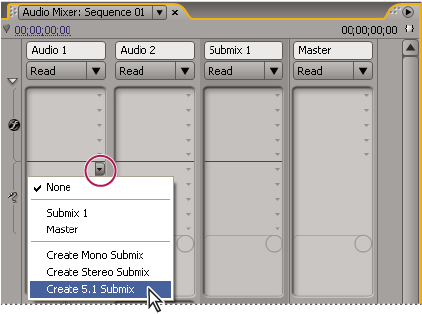 Choosing submix type in Audio Mixer
 In the Audio Mixer, select the
submix name from the track output menu at the bottom of the track.
In the Audio Mixer, select the
submix name from the track output menu at the bottom of the track.