

Move the current‑time indicator to a keyframe
Both the Effect Controls and the Timeline panels have keyframe navigators, which have left and right arrows to move the current‑time indicator from one keyframe to the next. In the Timeline panel, the keyframe navigator is enabled after you activate keyframes for an effect property.
 Do any of the following:
-
In the Timeline or Effect Controls panel, click a keyframe navigator arrow. The left‑pointing arrow moves the current‑time indicator to the previous keyframe. The right‑pointing arrow moves the current‑time indicator to the next keyframe.
-
(Effect Controls panel only) Shift‑drag the current‑time indicator to snap to a keyframe.
View full size graphic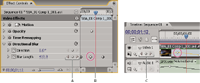
Keyframe navigator
- A.
- Keyframe navigator in Effect Controls panel
- B.
- Current‑time indicator
- C.
- Keyframe navigator in Timeline panel