

Add Lighting Effects
You can use up to five lights to introduce
creative effects. You can control such lighting properties as lighting
type, direction, intensity, color, lighting center, and lighting
spread. There is also a Bump Layer control for using textures or
patterns from other footage to produce special effects such as a
3D‑like surface effect.
Note: All Lighting Effects properties except
Bump Layer can be animated using keyframes.
You can
directly manipulate the Lighting Effects properties in the Program Monitor.
Click the Transform icon  next
to Lighting Effects in the Effect Controls panel to display the
adjustment handles and Center circle.
next
to Lighting Effects in the Effect Controls panel to display the
adjustment handles and Center circle.
View full size graphic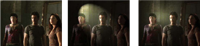
Lighting Effects: Original image (left), Spotlight applied
to image (center), and Omnilight applied to image (right)
- In the Effects panel, expand the Video Effects
bin, expand the Adjust bin, and then drag the Lighting Effects onto
a clip in the Timeline panel.
 If a clip is already selected in the
Timeline panel, you can drag the Lighting Effects directly to the
Video Effects section of the Effect Controls panel.
If a clip is already selected in the
Timeline panel, you can drag the Lighting Effects directly to the
Video Effects section of the Effect Controls panel. - (Optional) Click the Transform icon to display the light’s
handles and Center circle in the Program Monitor. You can directly
manipulate the position, scale, and rotation of a light by dragging
its handles and Center circle
 .
Note: If you have more than one light, Center circles for each light appear in the Program Monitor. Clicking a Center circle displays the handles for a specific light.
.
Note: If you have more than one light, Center circles for each light appear in the Program Monitor. Clicking a Center circle displays the handles for a specific light. - In the Effect Controls panel, use the following controls
to set the properties for the individual source light:
- Center
- Moves the light using X and Y coordinate values for the center of the light. You can also position a light by dragging its Center circle in the Program Monitor.
- Major Radius
- Adjusts the length of an Omni light or Spotlight. You can also drag one of the handles in the Program Monitor.
- Projected Radius
-
Adjusts the proximity of a Directional light’s source
to the Center circle . A
value of 0 positions the light at the Center circle and floods the image
with light. A value of 100 moves the light source far from the Center
circle, decreasing the light falling on the image. In the Program
Monitor, you can also drag the light source point to adjust its
distance from the Center circle.
- Minor Radius
- Adjusts the width of a Spotlight. Once the light becomes a circle, increasing the Minor Radius also increases the Major Radius. You can also drag one of the handles in the Program Monitor to adjust this property.
- Angle
-
Changes the direction of a Directional light or Spotlight.
Adjust this control by specifying a value in degrees. You can also
move the pointer outside a handle in the Program Monitor until it
turns into a double‑headed curved arrow
 , and
then drag to rotate the light.
, and
then drag to rotate the light.
- Intensity
- Controls whether a light is bright or less intense.
- Focus
-
Adjusts the size of the Spotlight’s brightest area.
Important: The Light Type determines which Lighting Effects properties are available. Make sure to click the Transform icon to display a light’s handles and Center circle in the Program Monitor.