

Fill rules for shapes
A fill operation works by painting color in the area defined as inside a path. Determining what is considered inside a path is easy when the path is something simple, like a circle. However, when a path intersects itself, or when a compound path consists of paths enclosed by other paths, determining what is considered inside is not as easy.
After Effects uses one of two rules to determine what is considered inside a path for the purpose of creating fills. Both rules count the number of times that a straight line drawn from a point crosses the path on its way out of the area surrounded by a path. The nonzero winding fill rule considers path direction; the even-odd fill rule does not.
After Effects and Illustrator use the nonzero winding fill rule as the default.
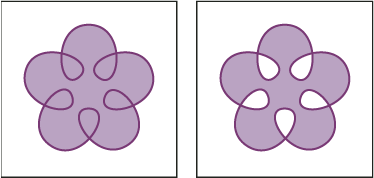
- Even-odd fill rule
- If a line drawn from a point in any direction crosses the path an odd number of times, then the point is inside; otherwise, the point is outside.
- Nonzero winding fill rule
-
The crossing count for a line is the total number of times
that the line crosses a left-to-right portion of the path minus
the total number of times that the line crosses a right-to-left
portion of the path. If a line drawn in any direction from the point
has a crossing count of zero, then the point is outside; otherwise,
the point is inside.
 A more intuitive way to think
of the nonzero winding rule is to think of a path as a loop of string.
A point is considered outside the path if you can put your finger
at that point and then pull the string away without it being caught,
wrapped around your finger.
A more intuitive way to think
of the nonzero winding rule is to think of a path as a loop of string.
A point is considered outside the path if you can put your finger
at that point and then pull the string away without it being caught,
wrapped around your finger.Because the nonzero winding fill rule takes path direction into account, using this fill rule and reversing the direction of one or more paths in a compound path is useful for creating holes in compound paths. To reverse a path’s direction, click the Reverse Path Direction On
 button
for the path in the Timeline panel.
button
for the path in the Timeline panel.